Managing Multiple GBP Locations: Complete Guide
Multi-location suspensions cascade fast — Sterling Sky has documented how linked profiles get reviewed together. Here's how to manage multi-location profiles without contamination risk.
Apr 17, 2026

Arif Hussain Shaik
12 min read
TL;DR
Managing multiple Google Business Profiles under one account is where most multi-location owners quietly trip Google's spam filters. Across 500+ cases, the fatal patterns are: identical phone numbers across locations, shared virtual-office addresses, duplicate owner emails, or bulk-identical descriptions (which Google's guidelines flag as deceptive content — support.google.com/business/answer/3038177). Sterling Sky has documented how linked profiles get reviewed together — one suspension cascades into several. The safe setup: use Google Business Profile Manager with location groups, give each location a unique phone and staffed address, customize descriptions, and run a quarterly audit for duplicate-signal drift. Document each location separately using Google's accepted evidence types (support.google.com/business/answer/4569145).
Ask an AI about this post
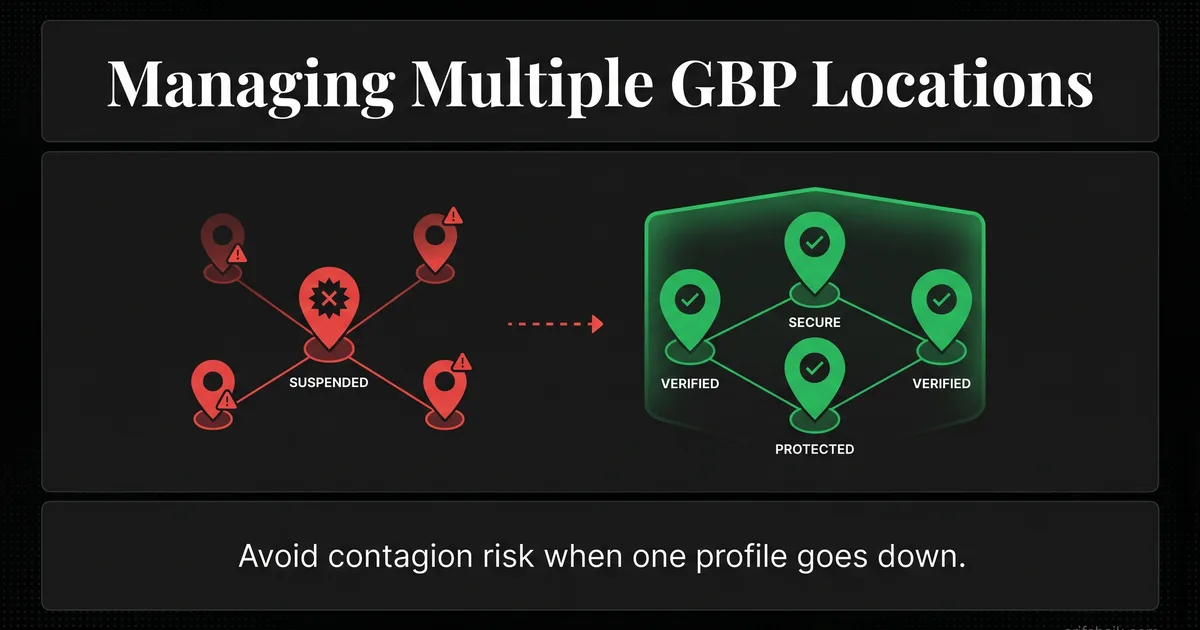
Multi-location suspensions are a large share of my consulting caseload. The pattern that keeps me busy is contamination: when one location goes down, linked profiles are at high risk of being reviewed by Google within the following weeks. Mike Blumenthal and Sterling Sky have documented this cascade behavior repeatedly. One bad profile can contaminate the entire account.
Managing multiple Google Business Profile locations is not the same as managing one location multiplied. The risk profile is different. The management structure matters more. And mistakes that would be minor for a single location become catastrophic when they cascade across 3, 10, or 50 profiles.
I have recovered multi-location suspensions for law firms, dental practices, franchise operations, and service-area businesses across multiple states. The recovery process is always harder and always more expensive than prevention would have been. This guide is about prevention — how to structure, manage, and maintain multiple GBP locations without triggering the contamination cascade.
The Contamination Problem: Why Multi-Location Is Dangerous
Google links profiles through shared ownership, shared management access, shared IP addresses, shared phone numbers, and shared website domains. When one profile in a linked group gets flagged, Google's systems evaluate the entire group.
Think of it like a credit report. If one account goes delinquent, it affects your overall score. Google does the same thing with linked GBP profiles. A suspension on one profile raises a flag on every profile connected to the same Google account or management structure.
The contamination pattern I see in my cases is not random. It follows a predictable sequence documented by Sterling Sky and Near Media in their agency-risk research:
- Week 1: One location gets suspended for a violation
- Week 2-3: Google reviews other profiles linked to the same account
- Week 3-5: Additional locations get flagged or suspended, often for different violations that were previously tolerated
The violations on the secondary locations were there all along. Google just was not looking. The first suspension triggers the audit that finds everything else.
Action step: If you manage multiple locations, audit every single profile today. Do not wait for one to trigger a review. Fix compliance issues across all locations proactively, because once one falls, the others are on borrowed time.
Case Study: A Three-Location Law Firm — Total Contamination
A multi-state law firm with three offices came to me after all three profiles went down in a cascade that took roughly 5 weeks from first suspension to total blackout. (Identifying details generalized.)
Here is what happened. The firm hired a marketing agency to manage their Google Business Profiles. Standard stuff — posts, review responses, photo uploads. What the firm did not know was that this agency was also managing profiles for other businesses that had been suspended for policy violations.
The agency had manager access to the firm's profiles using the same Google account they used for everything else — including the suspended profiles. When Google flagged the agency's account due to the other suspensions, it triggered a review of every profile that account had access to.
The first location went down with a soft suspension — the profile was still visible but the owner could not make edits. The firm did not realize this was a warning sign. Two weeks later, the second location got a hard suspension. Three weeks after that, the third office went down.
The fix took 30 days but required careful sequencing. First, we removed the agency's access from all three profiles immediately. Then I had the firm's managing partner — using a clean Google account with no prior association to suspended profiles — submit appeals for each location. We included documentation proving each location was a legitimate, separately operating office: lease agreements, utility bills, local phone numbers, and photos of each office.
All three were reinstated within 30 days. But those 30 days cost the firm significant lost leads based on their typical conversion rates from GBP. All because they granted account access to an unvetted agency.
Action step: Right now, go to each of your GBP locations and check who has manager or owner access. If any person or agency has access that you did not specifically vet, remove it. If an agency manages your profiles, ask them directly: do they use the same Google account to manage other clients? If yes, that is a contamination risk.
Account Structure: How to Set Up Multi-Location Safely
The way you structure ownership and management access determines your contamination risk. Here is what I recommend:
Owner account
One Google account should be the primary owner of all your locations. This should be a business email account (ideally Google Workspace) that belongs to a senior person at the company — not a marketing coordinator who might leave, and not an agency. The owner account is sacred. Protect it with 2-factor authentication, a strong unique password, and limited access.
Manager accounts
Add manager-level access for people who need to make day-to-day updates: posting, responding to reviews, uploading photos. Each manager should use their own dedicated Google account. Do not share login credentials across team members.
Agency access
If you work with an agency, give them manager access — never owner access. Use a dedicated agency email that is separate from their other client work. Ask the agency to create a new Google account specifically for your business. This isolates your profiles from whatever else the agency is managing.
The law firm case described above happened because the agency used one Google account for multiple clients. If they had used a dedicated account for each client, the contamination would not have spread.
Action step: Document your current account structure. Who is the owner? Who are the managers? What email accounts do they use? If any of those accounts are shared with non-business purposes or external agencies, restructure now.
Location-Specific Optimization (Not Copy-Paste)
The biggest optimization mistake I see with multi-location businesses: copying the same description, services, and photos across every location. Google detects duplicate content across GBP profiles the same way it detects duplicate content on websites. And duplicate GBP content can trigger a "spam" classification.
Business description
Each location needs its own description that references the specific city, neighborhood, and unique aspects of that office. A law firm in Orlando and a law firm in Denver serve different communities, different courts, and different jurisdictions. The descriptions should reflect that.
Services
If all locations offer the same services, you still need to write unique descriptions for each. Same services, different words. Same benefits, different angles. This is tedious work, but it prevents duplicate content flags and improves relevance for location-specific searches.
Photos
Every location should have its own photo set. Exterior shots of that specific office. Interior shots of that specific space. Team photos of the people who work at that location. Reusing the same photos across locations is a duplicate content signal — a risk pattern closely related to the deceptive content suspensions I see weekly — and it makes your profiles look generic to customers.
Posts
Each location should have its own posting cadence with location-specific content. A project completed at the Denver office should appear on the Denver profile, not the Orlando one. Customers in Orlando do not care about Denver projects.
Action step: Open all your location profiles side by side. Compare descriptions, services, and photos. If any two locations have identical content, rewrite them to be location-specific. Budget 30 minutes per location for this.
Bulk Management Tools: Use for Monitoring, Not Editing
Here is my hot take that goes against the grain of what most local SEO agencies sell: bulk management tools work fine for monitoring. Bulk edits trigger suspensions.
Tools that let you push the same change to 20 profiles simultaneously are convenient. They are also the fastest way to trigger Google's bulk-edit detection system. When Google sees 20 profiles update their hours, descriptions, or categories at the same time from the same account, it looks like automated manipulation. Individual, staggered updates look like a human managing their business.
I have seen this happen three times in the last year alone. A franchise pushes a holiday hours update to all 15 locations simultaneously. Google flags the activity. Two locations get suspended. The franchise panics, tries to fix the suspended ones, and the remaining 13 get flagged in the cascade.
What bulk tools are good for
- Monitoring all locations in one dashboard
- Tracking review volume and ratings across locations
- Getting alerts when a profile status changes
- Generating reports for multi-location performance
What to do manually
- Category changes (do these one location at a time, 24 hours apart)
- Business information updates (name, address, phone)
- Description updates
- Service additions or changes
- Hours changes (update one location per day during holiday seasons)
Slow, staggered, one-change-at-a-time updates beat automation every time. It is not efficient. But efficiency that gets half your locations suspended is not actually efficient.
Action step: If you use a bulk management tool, switch it to monitoring-only mode. Make all profile edits manually through the GBP dashboard, one location at a time, with at least 24 hours between changes to different locations.
NAP Consistency Across Locations
NAP consistency is critical for single locations. For multi-location businesses, it is a minefield. Every location needs its own distinct, consistent NAP, and those NAPs must not overlap or create confusion.
Common multi-location NAP problems
- Shared phone numbers: Two locations using the same phone number or a central call center number. Each location needs a unique local number.
- Inconsistent naming conventions: "Smith Law - Orlando" on GBP but "Smith Law Orlando Office" on Yelp and "Smith Law Group - FL" on Facebook. Pick one format and use it everywhere.
- Old addresses lingering online: A location that moved 2 years ago but the old address still appears on 15 directories. Google sees conflicting addresses and reduces confidence in both.
- Suite number variations: "Suite 200" on GBP, "Ste 200" on Yelp, "#200" on Facebook. Pick one format.
For each location, search the business name plus the city on Google. Check the first 3 pages of results. Every directory listing should match the GBP exactly — name format, address format, phone number. This is a 2-hour project per location, but it is foundational.
Action step: Create a master NAP document with the exact name, address, and phone number for each location. Use this as the reference when updating any directory. Share it with anyone who manages your online presence.
Review Management Across Locations
Multi-location review management has a unique challenge: review patterns that look consistent across locations can trigger spam detection and even look like fake review violations. If all 5 of your locations get 3 five-star reviews on the same day from similarly-named accounts, Google's systems flag this immediately. Use a natural review-earning approach instead.
Rules for multi-location reviews:
- Location-specific review requests. Only ask customers to review the specific location they visited. Never ask a customer who visited your Denver office to review your Orlando office.
- Stagger review requests. If you run a review campaign, start with one location and expand to others over 2-3 weeks. Do not blast all locations simultaneously.
- Respond from the right profile. Review responses should reference the specific location. "Thank you for visiting our Orlando office" — not a generic response copy-pasted across locations.
- Watch for cross-contamination. If an employee reviews your business, they should only review the location where they work. An employee reviewing all 5 locations looks like manipulation.
Action step: Audit your recent reviews across all locations. Look for the same reviewer names, same review dates, or generic review text appearing at multiple locations. If you find patterns, stop whatever process is creating them and switch to location-specific, staggered requests.
When One Location Gets Suspended: Damage Control Protocol
If one of your locations gets suspended, you have a narrow window to protect the others. Here is the protocol I follow:
- Hour 1: Audit the suspended location. Identify the violation. Is it a name issue? Category mismatch? Address problem? Review manipulation flag? Knowing the violation tells you what Google is looking for.
- Hour 2: Audit every other location for the same violation. If one location was suspended for a keyword-stuffed name, check if any other location has the same problem. Fix violations proactively before Google finds them.
- Hour 3: Check access permissions. Was the suspended location recently managed by a new person or agency? If so, do they also have access to other locations? Remove suspect access immediately.
- Day 1-2: Fix the violation on the suspended location and submit the appeal. Do not rush the appeal. Gather proper documentation. A well-documented first appeal succeeds more often than a rushed one followed by re-appeals.
- Ongoing: Monitor other locations daily. Watch for "suspended" status, edit restrictions, or any unusual activity. If another location gets flagged, you already know the playbook.
Speed matters here. The contamination window is typically 2-5 weeks. If you fix compliance issues across all locations within the first week, you significantly reduce the chance of cascade suspensions.
Action step: Save this protocol somewhere you can access fast. When a suspension hits, the first 24 hours of response determine whether you lose one location or all of them.
Franchise-Specific Considerations
Franchise operations face additional complexity because ownership structure does not always align with management structure. A corporate office might own the GBP profiles while individual franchisees manage day-to-day operations.
Recommendations for franchises:
- Corporate owns, franchisees manage. Corporate should be the primary owner of all profiles. Franchisees get manager access for their specific location only.
- Standardize categories, localize content. All locations should use the same primary category (for brand consistency) but unique descriptions, photos, and posts (for local relevance and duplicate avoidance).
- Central monitoring, local execution. Use a dashboard tool to monitor all locations. But all edits should be made manually at the location level.
- Onboarding and offboarding process. When a new franchisee joins, create a new manager account specifically for them. When a franchisee leaves, revoke access immediately. Do not let dormant access accounts linger.
Action step: If you operate a franchise, document your GBP access structure. Every location should have a clear record of who owns it, who manages it, and what access level they have. Update this document whenever staff changes happen.
Monthly Multi-Location Maintenance Checklist
Managing multiple locations requires a recurring maintenance cycle. Here is what I recommend checking monthly:
- Profile status: Verify all locations show "Published" status — run a full GBP audit quarterly. Catch soft suspensions early.
- Access audit: Check who has access to each profile. Remove any accounts you do not recognize.
- Information accuracy: Confirm hours, phone numbers, and addresses are correct across all locations. Especially important during holiday seasons.
- Review health: Check review velocity, ratings, and recent review content for each location. Flag any suspicious patterns.
- Post activity: Confirm each location posted at least once in the past month. Identify silent locations.
- Photo freshness: Each location should have at least one new photo per month.
- NAP audit: Spot-check 3-5 directory listings per location for consistency.
This monthly check takes 15-20 minutes per location. For a 10-location business, that is 3 hours per month. That 3 hours prevents the 30+ hours of recovery work (and the revenue loss) that follows a multi-location suspension.
Action step: Schedule a recurring monthly calendar event for your GBP audit. Use this checklist. Track results in a spreadsheet so you can spot trends across months.
Frequently Asked Questions
Can I use the same Google account to own multiple GBP locations?
Should I use a bulk management tool for multiple locations?
One of my locations was suspended. Will the others be affected?
How do I prevent contamination when using an agency?
Related Articles
Get notified when I publish new recovery guides
Struggling with a suspended GBP profile?
I’ve recovered 500+ profiles across 60+ countries. Let me look at yours for free — most assessments take under 24 hours.

Google Business Profile Recovery Specialist
Independent Google Business Profile recovery consultant specializing in suspensions, soft suspensions, and reinstatement appeals. Since 2019, recovered 500+ GBP profiles across 60+ countries — from solo tradespeople to multi-location law firms and healthcare groups. Former Upwork Top Rated freelancer (200+ completed contracts, 5-star average) now consulting direct. Research informed by Sterling Sky (Joy Hawkins), Local Search Forum, and daily work inside Google's Business Profile Community. Every case study and recovery playbook on this site is drawn from real client work — no theory, no AI-generated filler.