GBP Categories: How to Choose the Right Ones
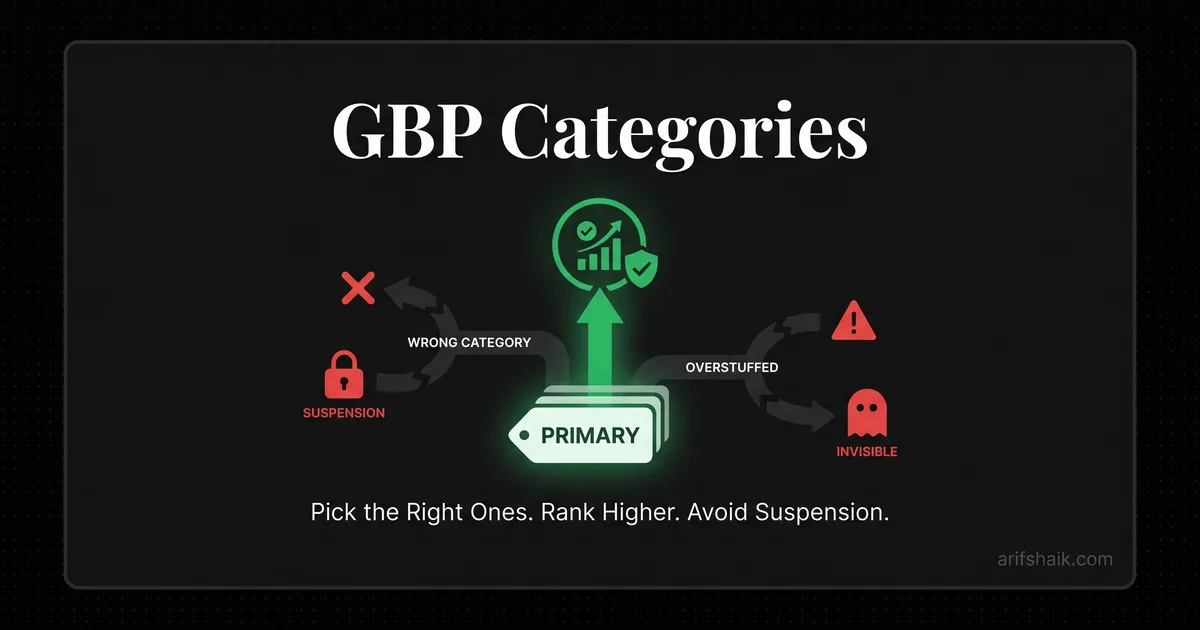
Pick the right Google Business Profile categories to rank higher and avoid suspension. Primary category is the #1 on-profile ranking lever (Sterling Sky, Dec 2025).
Apr 17, 2026

Arif Hussain Shaik
10 min read
TL;DR
Your primary category is the single most powerful on-profile ranking lever — Joy Hawkins at Sterling Sky confirmed this in her December 2025 Local Search Forum analysis, and it lines up with what I see across 500+ profiles. Pick the most specific category that describes your core revenue service (not the broadest), add up to nine secondary categories for related services, and never use the category field to describe what you are not. Mis-categorization is a Google guideline violation (support.google.com/business/answer/3038177) and a quiet driver of soft suspensions. Get the primary right and the ranking follows.
Ask an AI about this post
Primary category is the single highest-impact setting in your entire Google Business Profile — and the one most businesses get wrong. Joy Hawkins' December 2025 Sterling Sky category research confirmed the primary category is the #1 on-profile ranking lever.
I have audited thousands of GBP listings in my consulting work. Category mistakes appear on a majority of them. Sometimes the primary category is too broad. Sometimes it is flat-out wrong. Sometimes the owner stuffed in categories that do not map to services they actually provide. In every case, fixing the categories to match real services produced measurable ranking improvement — usually within two to four weeks.
Google uses your primary category as the strongest signal for which searches to show your listing in. Choose "Contractor" when "Roofing contractor" exists, and you are competing against every type of contractor in your area instead of ranking specifically for roofing. Choose "Auto body shop" when your main revenue comes from auto repair, and you show up for the wrong searches entirely.
This guide covers how to choose your primary category, how many secondary categories to use, the compliance traps that cause suspensions, and the real-world case studies that prove category changes work.
Primary Category: The #1 On-Profile Ranking Lever
Google's local search algorithm weighs your primary category more heavily than any other profile field. More than your business description. More than your reviews. More than your photos. When someone searches "plumber near me," Google first filters for listings with "Plumber" as their primary category, then ranks those listings by proximity, prominence, and relevance using map-pack ranking signals.
If your primary category does not match the searcher's intent, you are not in the initial filter. You are invisible for that search — in practice, the business is not showing on Google Maps for its money terms. It does not matter how many 5-star reviews you have or how close you are to the searcher — wrong primary category means you are not even competing.
I have observed this repeatedly with clients across different industries — changing only the primary category, with no other edits, often produces measurable ranking improvement within 30 days. This matches Sterling Sky's December 2025 research finding that primary category is the strongest single on-profile ranking factor. When the category change does not move rankings, it usually means the profile already had the right primary category or has separate issues (NAP inconsistencies, suspension flags) holding it back.
What to do: Open your GBP dashboard right now. Look at your primary category. Ask yourself: if a customer searches for what I primarily do, is this the exact term they would use? If there is any hesitation, it is probably wrong.
Primary Category Selection: A 4-Step Research Process
Google has over 4,000 business categories. They do not publish a full list, and the list changes — categories get added, renamed, split, and retired. Here is my process for finding the right one:
Step 1: Define your primary revenue activity
What generates the most revenue for your business? Not what you want to be known for. Not what you plan to offer next year. What puts the most money in your bank account right now. That is your primary category.
Step 2: Search for it in GBP
In your GBP dashboard, edit your primary category. Start typing your main service. Google will show matching categories. Look at every option before selecting. "Plumber" and "Plumbing service" are different categories with different implications. "Auto repair shop" and "Auto body shop" attract different search queries.
Step 3: Check what top competitors use
Search your main keyword on Google Maps. Look at the top 3 results in the Map Pack. Use a tool like GMB Everywhere (free Chrome extension) or Pleper's GBP Category tool to see their primary and secondary categories. If all three top-ranking competitors use "Roofing contractor" and you are using "Contractor," you have your answer.
Step 4: Match category to website
Your website's structured data (schema markup) should list the same business type as your GBP primary category. If your GBP says "Electrician" but your website's schema says "General contractor," that mismatch weakens your ranking signal and can trigger a manual review. Align them — a full profile audit will surface these mismatches fast.
What to do: Follow these four steps this week. The entire process takes about 30 minutes. If your primary category changes as a result, monitor your ranking for the next 30 days. You should see movement.
The Case That Proved Category Changes Work
An auto repair shop came to me because their rankings had dropped steadily over four months. They were visible in the Map Pack for "auto body shop" searches but nearly invisible for "auto repair" — which was 80% of their business.
The problem was obvious in the audit. Their primary category was "Auto body shop." Their website listed services as "car dealer, used cars, auto repair." The primary category did not match their main service, and the website's service list did not match the category either. Three-way mismatch: primary category said body shop, website said car dealer and repair, and their actual main service was auto repair.
Here is what we changed:
- Primary category: Changed from "Auto body shop" to "Auto repair shop"
- Secondary categories: Added "Auto body shop" and "Oil change service" — both services they actively provide
- Website: Updated service list to lead with auto repair, updated schema markup to match "AutoRepair" type
- Removed: "Car dealer" and "Used cars" from the website since they do not sell vehicles
Rankings for "auto repair near me" recovered within three weeks. They re-entered the Map Pack at position 2 and stabilized at position 1 within six weeks. No link building. No review campaigns. No ads. Just fixing the category.
What to do: If your rankings have plateaued or declined, check your primary category first. It is the fastest, free ranking change available to any business with a GBP listing.
Secondary Categories: How Many and Which Ones
Google allows up to 9 additional categories on top of your primary (Help ID 3038177). The old SEO advice was to add only 2-4 because extra categories supposedly "dilute" your relevance. Joy Hawkins' December 2025 Sterling Sky research tested this directly and found the "category dilution" theory is a myth — adding MORE relevant categories that accurately map to services you provide tends to help, not hurt, because each additional category expands the pool of searches you are eligible to appear for.
The real rule: use every additional category that genuinely represents a service you perform. Skip any that do not.
What actually hurts is category-service mismatch: claiming categories for services you do not perform. Google cross-references your categories against your website, services section, and reviews. A category that does not match your real business creates an inconsistency signal. The count is not the problem — accuracy is.
Good secondary category choices
- Services you actively and regularly provide
- Services listed on your website with dedicated pages
- Services that customers specifically search for in your area
- Categories that are closely related to your primary (e.g., "Plumber" primary with "Water heater installation service" and "Drain cleaning service" as secondaries)
Bad secondary category choices
- Services you plan to offer but do not currently provide
- Broad categories when specific ones exist (e.g., adding "Contractor" when you already have "Roofing contractor")
- Categories that conflict with your primary (e.g., "Plumber" primary with "Electrician" secondary — this looks like you are trying to game the system)
- Categories with no matching content on your website
What to do: Open your GBP and list all your current secondary categories. For each one, ask: do I actively provide this service, is it on my website, and would a customer specifically search for this? Remove any that do not pass all three tests.
Category Mistakes That Cause Suspensions
Most category issues hurt your ranking without causing a suspension. But some category configurations are active suspension triggers:
- Regulated industry mismatch: Claiming categories in regulated industries — financial services, healthcare, legal, insurance — when you are not licensed for that category is a fast path to suspension. A tax preparer listing "Financial planner" as a secondary category when they are not a registered financial advisor violates both Google's policies and potentially FINRA regulations.
- SAB with storefront-only categories: Some categories are restricted to businesses with physical storefronts that customers visit — "Restaurant," "Retail store," "Gas station." An SAB using one of these as a primary category is a compliance violation.
- Category-service impossibility: A solo practitioner dentist with "Dental clinic" as primary and "Hospital" as a secondary category. An individual attorney with "Law firm" and "Corporate office." These combinations are logically impossible for the business type and trigger automated review.
- Category used for ranking manipulation: Adding "Emergency [service]" categories when you do not offer emergency services, or adding "[City name] [service]" — which is not how categories work — is recognized as keyword-stuffing manipulation.
For the full list of suspension triggers and how to avoid them, see my GBP suspension prevention checklist. If you have already been suspended after a category edit, see why profiles get suspended after editing and the broader deceptive content playbook.
What to do: Audit your categories against this list. If any of your categories fall into a regulated industry you are not licensed in, remove them immediately. If you are an SAB, verify none of your categories are storefront-restricted.
Category Change Ranking Timeline: Day 1 to Day 60
Changing your primary category is the fastest way to move rankings, but it is not instant. Here is the typical timeline based on what I see across my client base:
- Days 1-3: Google processes the change. You may see temporary ranking fluctuations as Google re-evaluates your listing's relevance for different search queries.
- Days 4-14: Your listing begins appearing for search queries aligned with the new primary category. Rankings are typically volatile during this period — appearing and disappearing from the Map Pack for various searches.
- Days 15-30: Rankings stabilize. If the category change was correct, you should see measurable improvement in visibility for your target search terms by this point.
- Days 30-60: Full effect. The combination of category signal plus accumulated reviews, citations, and engagement data produces your steady-state ranking.
One warning: changing your primary category can trigger an automated review of your profile. This is normal. Google re-verifies the listing when major settings change — sometimes via video verification. Do not panic if your listing shows "pending verification" for a day or two after the change. If your listing is legitimate and the new category is accurate, the verification passes automatically.
For more on what happens when edits trigger suspensions, see Google Profile Suspended After Editing: Why & How to Fix, and if the appeal gets denied the denied appeal playbook plus a proven appeal template.
What to do: After changing your primary category, do not make other major edits for at least two weeks. Let the category change settle. Track your ranking for your main keywords daily during this period using a local rank tracker or manual searches in incognito mode.
Category Strategy by Industry
Every industry has its own category nuances. Here are the patterns I see most often in my client work:
Home services (plumbers, electricians, HVAC)
Always use the most specific trade category as primary. "Plumber" over "Plumbing service." "Electrician" over "Electrical contractor." Add 2-3 secondary categories for your specialty services — "Water heater installation service," "Drain cleaning service." Skip the broad "Contractor" category entirely. Many of these trades run as home-based SABs.
Legal
Use your practice area as primary. "Personal injury attorney" beats "Lawyer" or "Law firm" — see the law-firm recovery case for a real example. Solo practitioners should use the individual practitioner category, not the firm category. Firms with multiple practice areas should pick the highest-revenue practice for primary and add 2-3 other practice areas as secondaries.
Healthcare
Use the specific provider type. "Dentist" over "Dental clinic" — see the dental clinic case study for what can go wrong with provider category choices. "Dermatologist" over "Skin care clinic." The provider-specific category ranks better because patients search for providers, not facilities. Multi-provider practices should use the facility category as primary only if they have multiple provider types under one roof.
Restaurants and food service
Use the specific cuisine or format. "Mexican restaurant" over "Restaurant." "Pizza delivery" over "Pizza restaurant" if delivery is your main channel. This is one category where specificity directly matches search behavior — people search "Mexican food near me," not "restaurant near me."
For industry-specific suspension recovery guides with category recommendations, check my suspension types guide, the monthly compliance audit checklist, or the real-estate agent recovery guide if you are in that vertical.
What to do: Find your industry above. Compare the recommended approach to your current category setup. If there is a more specific primary category available for your industry, switch to it this week.
Frequently Asked Questions
How many GBP categories should I use?
Can changing my primary category cause a suspension?
How do I find out what categories my competitors use?
Should my secondary categories match my website services?
Related Articles
Get notified when I publish new recovery guides
Struggling with a suspended GBP profile?
I’ve recovered 500+ profiles across 60+ countries. Let me look at yours for free — most assessments take under 24 hours.

Google Business Profile Recovery Specialist
Independent Google Business Profile recovery consultant specializing in suspensions, soft suspensions, and reinstatement appeals. Since 2019, recovered 500+ GBP profiles across 60+ countries — from solo tradespeople to multi-location law firms and healthcare groups. Former Upwork Top Rated freelancer (200+ completed contracts, 5-star average) now consulting direct. Research informed by Sterling Sky (Joy Hawkins), Local Search Forum, and daily work inside Google's Business Profile Community. Every case study and recovery playbook on this site is drawn from real client work — no theory, no AI-generated filler.