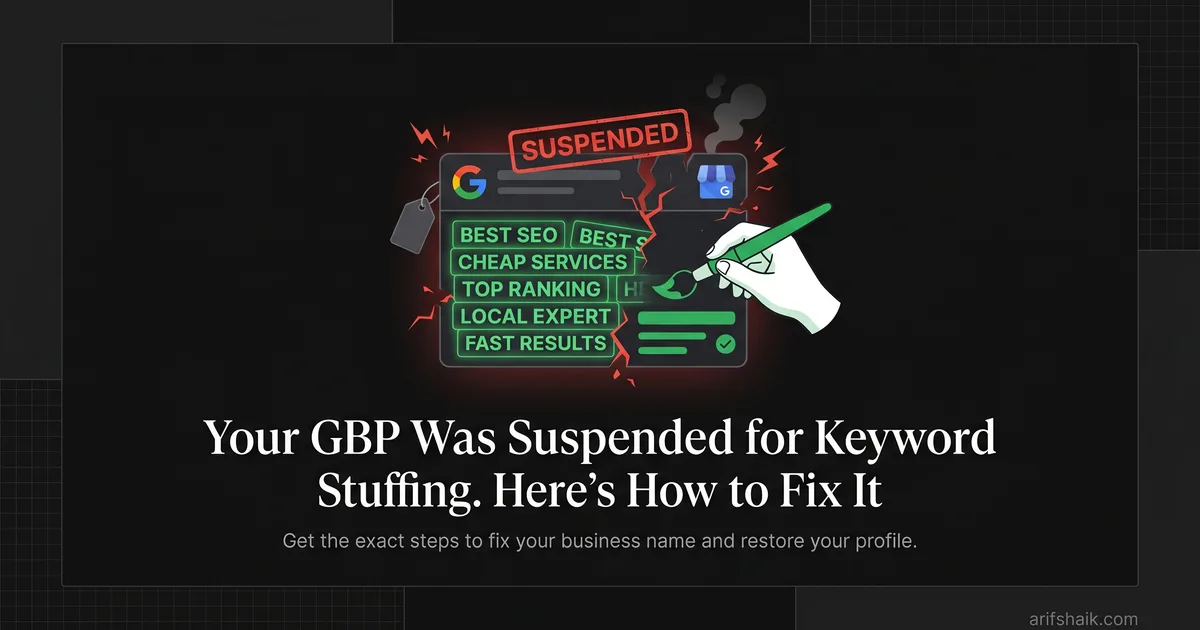
GBP Suspended for Keyword Stuffing: How to Fix It
GBP suspended for keyword stuffing? Get the exact steps to fix your business name, submit a winning appeal, and restore your profile fast.
Feb 25, 2026 · Updated May 23, 2026

Arif Hussain Shaik
12 min read
TL;DR
Keyword-stuffed business names ("Joe's Plumbing & Emergency Drain Cleaning Denver") violate Google's guidelines, which require the profile name to match the real-world legal or DBA name on signage (support.google.com/business/answer/3038177). In my 600+ recovery cases this is one of the most common triggers and one of the fastest to fix — rename the profile to the true legal name, update signage photos, and file an appeal citing the correction with Google's four accepted document types (support.google.com/business/answer/4569145). Joy Hawkins at Sterling Sky has repeatedly shown that keyword stuffing also hurts ranking, not just suspension risk. Clean the name, keep the keywords in your website and posts instead.
Ask an AI about this post
As of April 2026, keyword stuffing in the business name field remains the single most common trigger behind GBP suspensions — accounting for roughly 1 in 3 cases I handle. Google's 2026 name-field enforcement has only gotten stricter.
GBP keyword stuffing suspension happens when your business name contains words beyond your legal name — location terms, service descriptors, or promotional language. Google detects these patterns automatically and suspends the profile, often within hours. This guide covers identification, correction, documentation, and reinstatement step by step — for context on the different suspension types Google uses, see our breakdown.
Your business disappeared from Google Maps. The dashboard shows "suspended." Calls stopped coming in. Revenue drops by the hour.
This is fixable. Most businesses recover within a week when they follow the right process.
Google suspends profiles when the business name field contains anything beyond your legal business name. Adding location names, service descriptions, or promotional terms triggers their detection system. Google calls this keyword stuffing, and they treat it seriously.
This guide walks you through complete recovery. You will identify the violation, gather documentation, submit an appeal that works, and protect your profile after reinstatement.
This process comes from handling over 600 GBP suspensions across 60 countries. These steps work for first-time violations and repeat cases. Let's get your business back online.
Key Stats: Keyword Stuffing Suspensions
- Keyword stuffing in the business name is the single most common suspension trigger across the 600+ cases I've handled — Google's representation guidelines (support.google.com/business/answer/3038177) explicitly ban extra descriptors, locations, or taglines.
- Enforcement is inconsistent by design — Sterling Sky's 50-case keyword-spam study (Colan Nielsen, Dec 2020 — sterlingsky.ca/50-cases-of-keyword-spam/) found only 40% of reported keyword-stuffed profiles received any action (60% warning, 20% soft suspension, 20% hard suspension).
- Reinstatement timing is unpredictable — Mike Blumenthal documented appeal response times stretching from about five days to nearly five weeks (Search Engine Journal, March 2025 — searchenginejournal.com/google-business-profile-suspensions-rise-appeals-are-delayed/542602/).
What Google Considers Keyword Stuffing
Google wants one thing in your business name field: your legal business name. Nothing more.
Their algorithm flags specific patterns. Location names like cities or neighborhoods trigger detection. Service descriptors cause problems. Terms like "24/7," "emergency," "best," or "affordable" violate guidelines. Promotional language such as "free estimates" or "family owned since 1985" does the same.
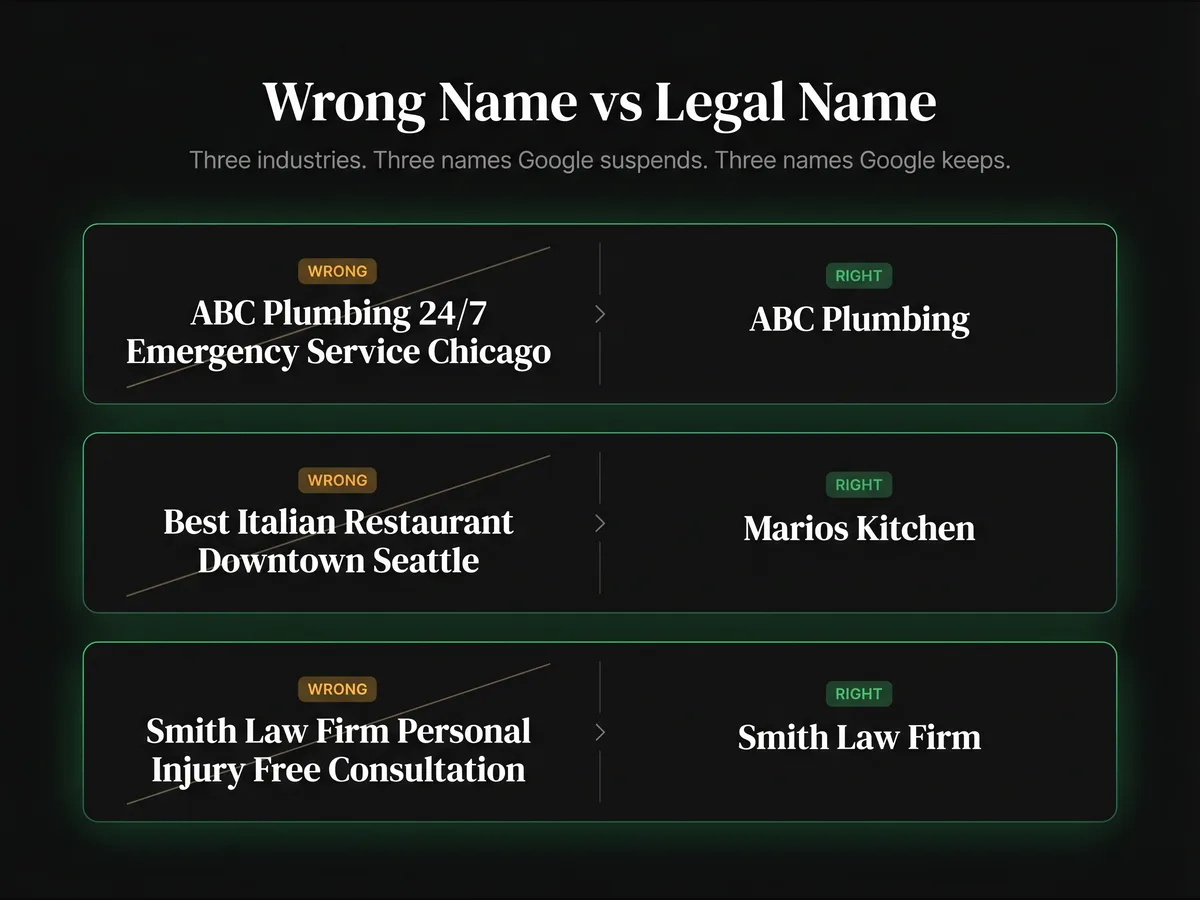
Here's what violation looks like:
| Violates Google policy | Compliant name |
|---|---|
| "ABC Plumbing 24/7 Emergency Service Chicago" | "ABC Plumbing" |
| "Best Italian Restaurant Downtown Seattle" | "Mario's Kitchen" |
| "Smith Law Firm, Personal Injury Attorneys, Free Consultation" | "Smith Law Firm" |
Your legal business name might include a location if it is part of your registered name. "Chicago Pizza Company" is acceptable if that is the name on your business license. "Pizza Palace, Chicago's Best" is not.
Business name violations are the single most common cause of suspension I see for established businesses — Google's representation guidelines (support.google.com/business/answer/3038177) forbid any content in the name field beyond the real-world brand as it appears on storefronts, receipts, and legal paperwork.
Sometimes competitors report your profile. Sometimes customers do. But Google's algorithm catches most violations before any report is filed. The system scans for keyword patterns automatically.
Finding What Triggered Your Suspension
Pull up your business registration documents. Compare the name on your license to the name on your suspended GBP.
Look for these additions:
| Trigger type | What to look for |
|---|---|
| Location additions | City name, neighborhood, or service area. These trigger the algorithm even when they seem helpful to customers. |
| Service descriptors | Words describing what you do: "Roofing," "cleaning," "repair," "installation." If these words are not on your business license, they should not be in your GBP name. |
| Promotional language | Quality claims ("Best," "top," "premier," "leading"), availability terms ("24/7," "same day," "emergency"), and trust signals ("Licensed," "insured," "certified"). |
| Time references | "Since 1990," "established 1985," "over 30 years." These violate guidelines. |
Some violations require close examination. You might have added "LLC" or "Inc." when your registration says "LLC" or vice versa. You might have abbreviated your name differently. Exact match matters.
Check your edit history. Google tracks profile changes. A change you made months ago might have triggered a delayed review.
Before you fix anything, screenshot your current profile. You want documentation of what the violation looked like. This helps if you need to explain the situation during escalation.
Documents Google Wants to See
Your appeal needs proof that you own a legitimate business with the name you claim.
Google's four accepted document categories:
Google's reinstatement help page (support.google.com/business/answer/4569145) lists exactly four evidence types it will accept: official business registration, a business license, tax certificates, and utility bills for the business (electricity, phone, water, or internet). Everything else is optional supporting material — helpful but not guaranteed to move the needle.
Your business license is usually the strongest single piece of evidence because it shows your legal registered name exactly as the government recognizes it. Keep it current — expired licenses get flagged.
Tax registration works well. Your EIN confirmation letter, sales tax permit, or state tax registration shows your business name as tax authorities know it.
Optional supporting documents (beyond Google's four):
Professional licenses, bank statements showing your business account name, and insurance certificates can reinforce your case, but reviewers may ignore them if the four core categories are missing. Lead with the four Google actually asks for.
Document requirements:
Document date affects review outcome. Documents from the last 90 days perform best. Old documents raise questions about whether you still operate under that name.
Address must match. The business address on your documents should match your GBP listing address. Mismatches slow down review.
Name must be exact. If your license says "John's Plumbing LLC" your GBP must say "John's Plumbing LLC." Not "John's Plumbing." Not "Johns Plumbing LLC." Exact.
One business recovered successfully by submitting their state contractor license showing their legal name without keywords. The document was dated the previous month. The address matched their GBP listing. Appeal approved in four days.
Fixing Your Profile and Submitting the Appeal
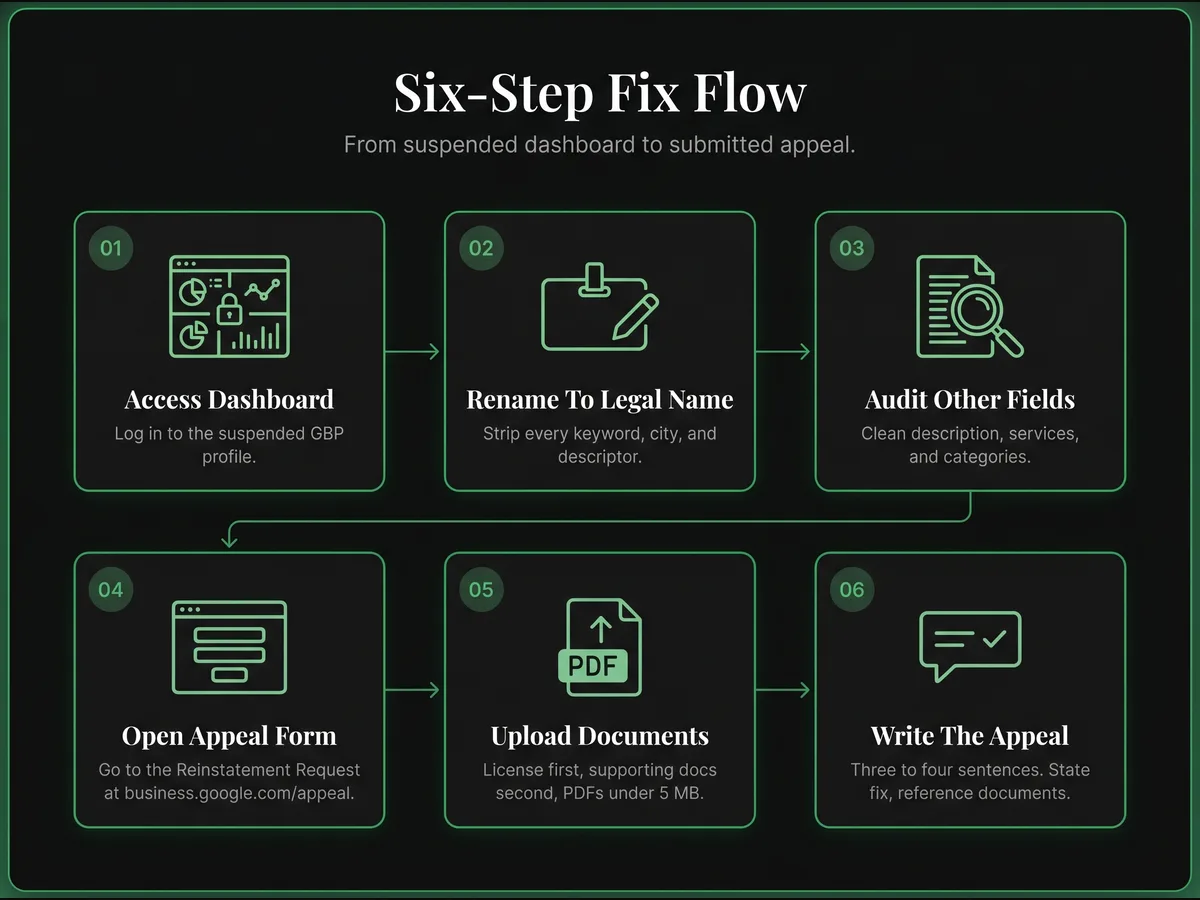
Step one: Access your GBP dashboard. You can still log in even when suspended. Some features are limited, but you can edit basic information.
Step two: Change your business name. Delete everything except your legal business name. Make it match your documentation exactly. Save the change.
Step three: Review other fields. Sometimes keyword stuffing spreads beyond the business name. Check your business description. Review your services. Remove any repetitive keyword patterns that look unnatural.
Step four: Check your email for Google's suspension notice — it contains an Appeal button that routes directly to the correct review queue. If you cannot find that email, use the manage-appeals form: support.google.com/business/workflow/13569690. Select your suspended profile.
Step five: Upload documentation. Use PDF format for reliability. Keep files under 5MB each. Include your business license first. Add supporting documents second. Have everything assembled before opening the evidence form. It may time out after a period of inactivity, but Google does not publish a 60-minute deadline. Don't rush; submit clean documents when ready.
Step six: Write your appeal explanation.
Keep it short. Three to four sentences work best. State what was wrong. Confirm you fixed it. Reference your documentation.
Here is language that works (see our full 2026 appeal template and reinstatement letter examples):
"My business name was incorrectly listed as [old name with keywords]. I have corrected it to [legal name] which matches my attached [document type]. I understand Google's guidelines for representing my business and will maintain compliance."
Do not explain why you added keywords originally. Do not apologize extensively. Do not argue that your keywords were accurate or helpful. Just state the facts.
Before you hit submit:
Keep every file under 5MB and in PDF format. The upload form will silently reject oversized or unsupported files — convert images to PDF before opening the form, not after.
Confirm your business name is already corrected in the dashboard before submitting. The reviewer checks the live profile state, not what you describe in the appeal letter. Filing with the keyword-stuffed name still showing is one of the most common reasons first appeals are denied before a human even reads them.
Name your files descriptively before opening the form — business-license-2026.pdf not IMG_4421.pdf. Reviewers work through multiple documents per case. Clear filenames make it easier for them to match each document to your appeal claims.
The Waiting Period
You submitted your appeal. Now you wait.
Standard timeline: Google's stated review window is up to 5 business days. In practice, 2025–2026 queues have stretched well beyond that — Mike Blumenthal of Near Media documented windows of nearly 5 weeks in some queues (Search Engine Journal, March 2025). My own caseload over the same period averaged 12–18 business days for first-decision turnaround. Build your expectations around weeks, not days.
Factors that extend review time:
Your account history matters. Previous suspensions or guideline violations slow things down. Google reviews patterns.
Violation severity affects timeline. A clearly stuffed name with five extra keywords takes longer to clear than a minor location addition.
Holiday periods delay everything. Google staffing decreases during major holidays. Account for this in your expectations.
Checking your status:
Log into your GBP dashboard daily. The suspension banner will update when status changes. You may receive an email, but dashboard checks are more reliable.
What not to do while waiting:
Do not submit another appeal while the first is still under review. Multiple submissions do not speed up the process — they reset your position in the queue. Wait for a decision before taking any further action.
Do not create a new profile. This is the most damaging mistake you can make. Google connects profiles to your account. Creating a new one while suspended triggers duplicate listing flags. Some business owners end up with account-level restrictions that take weeks to resolve.
Do not call Google support repeatedly. Phone support has limited ability to affect suspension status. Calling multiple times does not accelerate the process and can create conflicting tickets.
Do not make additional profile edits during appeal review. Let the appeal process complete before making changes.
Use this time to prepare. Gather more documentation in case your first appeal is denied. Plan your post-reinstatement audit. Research GBP optimization practices that keep you compliant.
When Your Appeal Gets Denied
Sometimes appeals fail. Google sends denial with a reason. Read it carefully.
Common denial reasons:
Insufficient documentation. Your business license was expired or unreadable. Submit again with better documents.
Name still non-compliant. You may have missed a keyword. Review again. "ABC Plumbing Co" might still differ from your license that says "ABC Plumbing Company."
Address mismatch. Your documentation shows a different address than your GBP listing. This needs resolution before reinstatement.
Your next step:
Fix the specific issue cited. Do not resubmit the same appeal. Address the denial reason directly.
The appeal flow has four steps with no fixed cap. Step 1: first appeal via the Appeal button in Google's suspension email, or the manage-appeals form (support.google.com/business/workflow/13569690). Step 2: if denied, request additional review via the local-appeals form (support.google.com/business/contact/local_appeals) — re-diagnose from scratch and attach documents you did not include the first time. Every submission must be materially stronger than the last. Step 3: if denied again, reply directly to Google's denial email with new evidence not yet submitted. Reviewers read these replies. Step 4: if still denied, wait the full 25 days from the last rejection, then resubmit via the local-appeals form. The 25 days is my own practice, not a published Google rule. Google does say not to submit multiple appeals for the same issue before you have a decision, so going early risks the new one being read as a duplicate. The GBP Community Forum and @GoogleBusiness on X are useful parallel channels — not replacements for this flow, but worth using when the case is stuck.
Do not create a duplicate profile while your appeal is pending. Per Google's official guidance (support.google.com/business/answer/4569145), creating a new Business Profile for the same business while reinstatement is under review can get both profiles suspended — and you permanently lose your review history on the original.
Post-Reinstatement Actions
Your profile is back. Take these steps immediately.
Day one actions:
Verify all information is accurate. Check your hours. Confirm your phone number. Review your categories. The suspension process sometimes causes data issues.
Check your reviews. Reviews from before the suspension usually return after reinstatement. Reviews posted during the suspension are often removed by Google's automated filters — this is expected, not a second suspension. If legitimate pre-suspension reviews are still missing after a few days, contact GBP support through the dashboard. See the guide on reviews removed after reinstatement for the full recovery path.
Screenshot your compliant profile. Document what "correct" looks like. You need this reference if questions arise later.
First week actions:
Complete video verification if requested. Google sometimes requires video after suspension. Have your smartphone ready. Show your business location clearly. Display your signage. The process takes about ten minutes.
Upload fresh photos. Current exterior photos. Interior images. Team photos if appropriate. Fresh content signals an active, legitimate business.
Monitor your listing daily. Check that no unauthorized edits appear. Third parties can suggest edits to your profile. Reject anything that modifies your business name.
What to expect after reinstatement:
Reinstatement does not restore your previous rankings. The profile re-enters Google's ranking system from scratch. Calls and website traffic typically drop in the weeks after reinstatement before gradually recovering — the rebuild takes time, not days. There is no spike. Reinstated profiles get re-suspended at a rate roughly 3× higher than profiles that have never been suspended, so compliance is now more critical than ever.
Reviews from before the suspension usually return. Reviews posted during the suspension period are often filtered out by Google's automated systems. Rebuild review velocity through legitimate new review requests once the profile is live again — see the guide on getting reviews after reinstatement.
Ongoing protection:
Set a calendar reminder to run a monthly compliance audit. Check that your business name remains compliant. Review for unauthorized edit suggestions — especially if your profile was previously suspended after an edit. Verify information accuracy.
Never add keywords to your business name again. The temptation exists. Competitors might stuff their names — you can report their violations instead. Resist. Your visibility depends on compliance, not keyword tricks.
Use legitimate optimization instead. Accurate categories. Complete services. Regular posts. Customer reviews. These factors improve ranking without risking suspension — use our full suspension prevention checklist as your ongoing guardrails.
Moving Forward
GBP suspension for keyword stuffing is a recoverable situation. The process is straightforward when you follow these steps:
Identify the violation by comparing your profile to legal documents. Gather current documentation proving your business name. Fix your profile before submitting appeal. Write a short, factual appeal explanation. Submit once and wait for response. Take protective actions after reinstatement.
Every day your profile is suspended costs you customers. People searching for your services find your competitors instead. Revenue walks out the door.
Fix your business name today. Submit your appeal before end of business. The sooner you start, the sooner you recover.
Have a question? Book a free assessment and let's discuss your situation.
Frequently Asked Questions
How long does GBP reinstatement take?
Will I lose my reviews permanently?
What if my appeal gets denied?
Should I create a new profile while suspended?
Do I need professional help for reinstatement?
New GBP recovery playbooks, straight to your inbox. No spam.
Suspended GBP? I've reinstated 600+ — 95% success.
I’ve recovered 600+ profiles across 60+ countries. Let me look at yours for free — most assessments take under 24 hours.

Google Business Profile Recovery Specialist
Independent Google Business Profile recovery consultant specializing in suspensions, soft suspensions, and reinstatement appeals. Since 2019, recovered 600+ GBP profiles across 60+ countries — from solo tradespeople to multi-location law firms and healthcare groups. Former Upwork Top Rated freelancer (200+ completed contracts, 5-star average) now consulting direct. Research informed by Sterling Sky (Joy Hawkins), Local Search Forum, and daily work inside Google's Business Profile Community. Every case study and recovery playbook on this site is drawn from real client work — no theory, no AI-generated filler.