Google Profile Suspended After Editing: Why & How to Fix
Your Google Business Profile was suspended right after you made an edit? Here's why profile changes trigger suspensions and how to get reinstated safely.
Jan 25, 2026 · Updated Apr 14, 2026

Arif Hussain Shaik
5 min read

TL;DR
Edits trigger Google's re-review algorithm more aggressively than any other profile action — name changes, address changes, category swaps, and service-area shrinks are the top four triggers I see across 600+ cases. Google compares the new edit against its crawl of your website, your citations, and public records (support.google.com/business/answer/3038177); a mismatch can auto-suspend within minutes. The fix is not to reverse the edit — it's to align external signals (website footer, directory listings, legal filings) with the new profile data, then file an evidence-backed appeal citing Google's four accepted document types (support.google.com/business/answer/4569145).
Ask an AI about this post
Updated June 2026: Post-edit suspensions are one of the fastest-growing categories I recover in 2026. Business-name and address edits are the two fields Google's fraud detection scrutinises most aggressively — when the appeal names the exact field that changed and attaches the justifying document, these cases tend to resolve faster than most other suspension types.
Why Editing Your GBP Can Trigger a Suspension
This is one of the most confusing suspension scenarios: you log in, make what seems like an innocent update to your business profile, and wake up suspended the next morning. What happened?
Google's fraud detection algorithms are triggered by certain types of profile changes. When you edit your listing, it goes through an automated review. If the edit matches patterns associated with spam or fraud, Google suspends the profile pending manual review — it's the same underlying classifier that flags deceptive content and "no reason given" suspensions.
After recovering hundreds of post-edit suspensions, I can tell you the pattern is mechanical: a legitimate edit that looks like a fake business takeover to Google's classifier. The good news is these cases resolve quickly when you give Google a clean audit trail — the original field, the new field, and the document that justifies the change, pulled from our GBP reinstatement documents checklist.
Two Google Rules Before You Appeal
Two rules from Google's official reinstatement page (support.google.com/business/answer/4569145) that matter most for post-edit cases:
- Evidence-form upload tactic. When Google opens the evidence form attached to your appeal, complete the upload in one sitting. The form can time out after inactivity, but Google does not publish a 60-minute deadline. Have everything ready before you click the link. Gather screenshots of the old field, the new field, and the justifying document before opening the form.
- Do not create a duplicate profile while the appeal is pending. A new profile for the same business during review can suspend both and permanently lose the original review history.
Edits That Commonly Trigger Suspensions
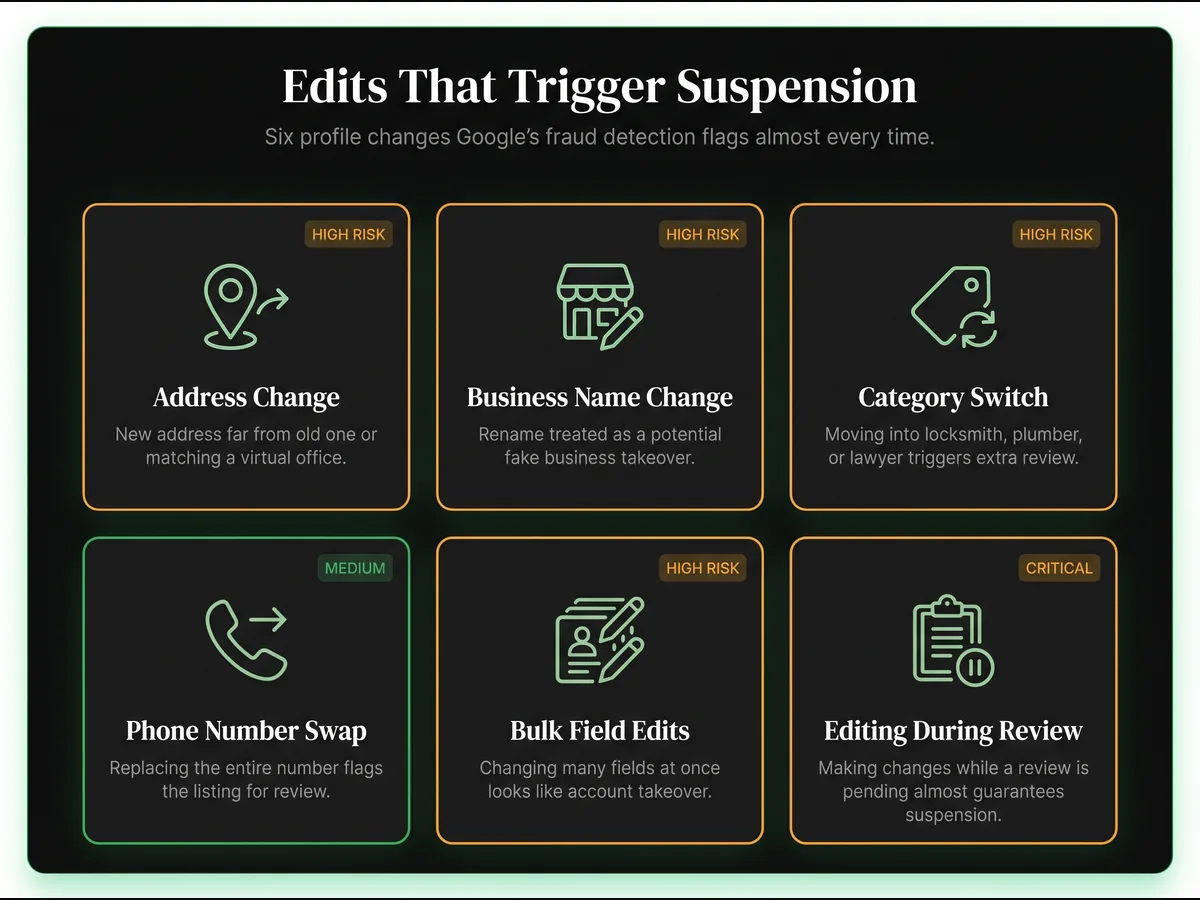
- Changing your business address: Especially if the new address is far from the old one or is a known virtual office or an address that matches the wrong-address suspension pattern.
- Changing your business name: Name changes trigger intense scrutiny, and any keyword modifier can flip them into keyword-stuffing territory. Google treats this as potentially creating a new fake business.
- Adding/changing categories: Switching to a high-spam category (locksmith, plumber, lawyer) triggers extra review — pick primaries carefully with our GBP categories guide.
- Major phone number changes: Replacing your number entirely can flag the profile.
- Bulk edits to multiple fields: In my caseload, changing several sensitive fields (name, address, category) at once correlates with post-edit suspensions — this is especially risky when teams manage multiple Google Business Profiles. Google hasn't published this as a rule, but the pattern is consistent enough that I always stagger edits.
- Editing during an ongoing review: If Google is already reviewing your profile and you make changes, suspension becomes likely.
How to Make Safe Edits
- Change one field at a time. Wait 24-48 hours between major changes. Run the GBP audit first so you know exactly which field is about to change.
- For address changes, update your business registration first, then update GBP.
- For name changes, have your updated DBA or business registration ready to submit if challenged.
- Never edit your profile while a reinstatement request is pending — editing during review is the second-most-common cause of denial in my caseload after missing documents from our reinstatement documents list.
- Have your supporting documentation (state filing, new lease, updated license) ready before you hit save — appeals move faster when you can attach proof immediately, especially if you're about to submit via the 2026 GBP appeal template.
Recovery Steps
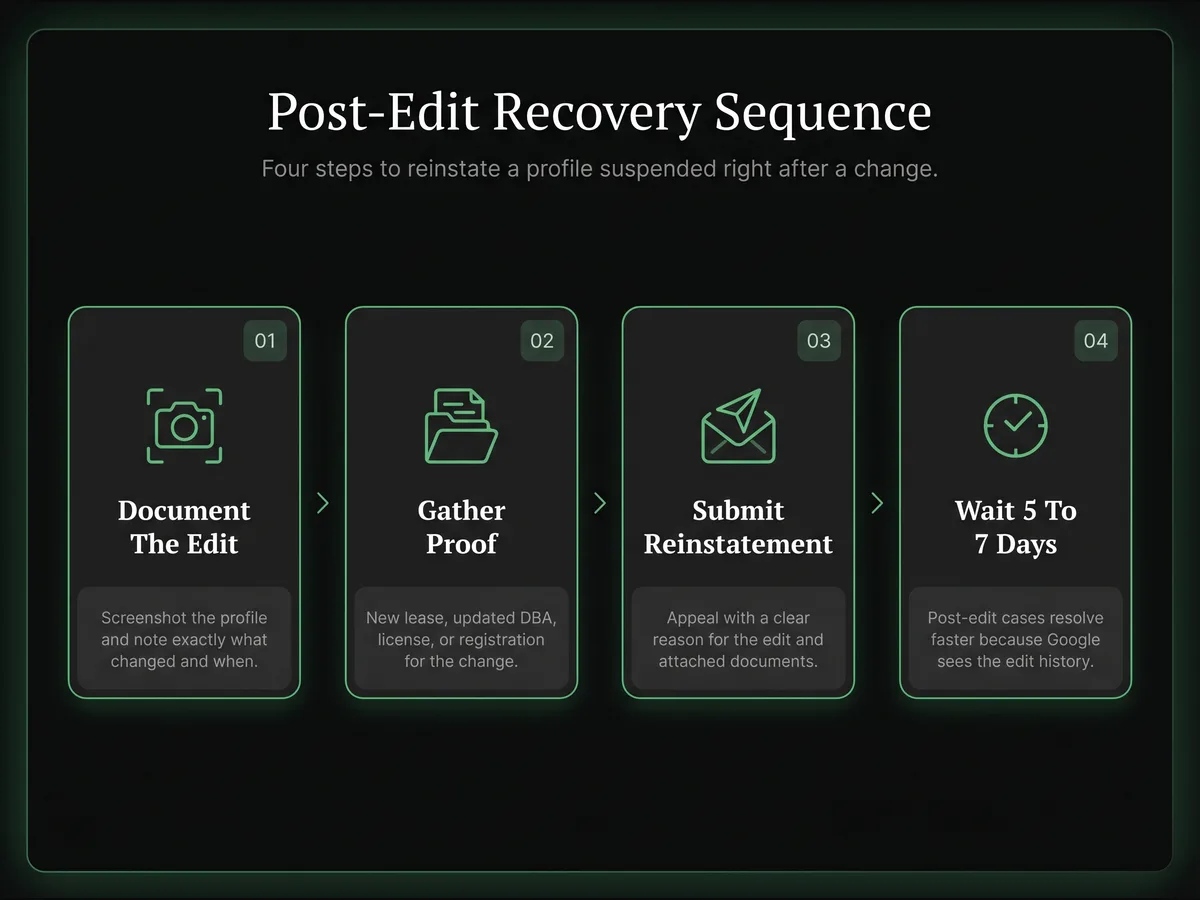
- Step 1: Document what edit you made and when. Take screenshots of your profile's current state.
- Step 2: Gather documentation supporting the edit you made (e.g., new lease for address change, new DBA for name change) — the exact list is in our documents needed for GBP reinstatement.
- Step 3: Submit a reinstatement request explaining the edit was legitimate and attaching supporting documents — the phrasing patterns are in our GBP reinstatement letter examples. If the appeal is denied, follow what to do when your Google appeal is denied.
- Step 4: Wait 5-7 days (full timing in how long GBP reinstatement takes). These suspensions usually resolve faster because Google can see your edit history.
A Real Post-Edit Recovery Example
In March 2026 a Phoenix HVAC company I work with was suspended within four hours of updating their business name from "Desert Air HVAC" to "Desert Air Heating & Cooling LLC" — the legal name on their newly-refreshed state registration. No other field was changed. No keyword stuffing. No new address. Just the LLC suffix.
Google's automated classifier read the edit as a potential business takeover and suspended the listing under a deceptive content flag. The owner's first instinct was to revert the edit, which would have compounded the problem — reverting during a pending review almost always extends the suspension.
We documented the edit instead. One screenshot of the old name. One screenshot of the new name. A PDF of the state Secretary of State registration showing the exact legal name change on 2026-03-02. A copy of the business license reissued under the new name. Four documents, all naming the same entity.
The appeal was three sentences: we updated our business name to match our legal registration, here are the four documents that prove the change is legitimate, please reinstate. The profile came back live on day 4, unchanged. Total downtime: just under 96 hours. The pattern holds across every post-edit case I've handled — focused documentation beats defensive reverts every single time. Once reinstated, we locked in the monthly GBP compliance audit and the prevent GBP suspension checklist so the next legal-name refresh wouldn't repeat this.
Frequently Asked Questions
Can I undo the edit that caused the suspension?
How long do post-edit suspensions typically last?
Which edits are most likely to trigger a suspension?
Should I make multiple edits at once or one at a time?
Does Google notify you before suspending after an edit?
Related Articles
New GBP recovery playbooks, straight to your inbox. No spam.
Suspended GBP? I've reinstated 600+ — 95% success.
I’ve recovered 600+ profiles across 60+ countries. Let me look at yours for free — most assessments take under 24 hours.

Google Business Profile Recovery Specialist
Independent Google Business Profile recovery consultant specializing in suspensions, soft suspensions, and reinstatement appeals. Since 2019, recovered 600+ GBP profiles across 60+ countries — from solo tradespeople to multi-location law firms and healthcare groups. Former Upwork Top Rated freelancer (200+ completed contracts, 5-star average) now consulting direct. Research informed by Sterling Sky (Joy Hawkins), Local Search Forum, and daily work inside Google's Business Profile Community. Every case study and recovery playbook on this site is drawn from real client work — no theory, no AI-generated filler.