Virtual Office GBP Suspended: What to Do Now
Google suspended your Business Profile for using a virtual office? Here's why it happened, your recovery options, and how to stay compliant going forward.
Feb 15, 2026 · Updated Apr 12, 2026

Arif Hussain Shaik
6 min read

TL;DR
Virtual offices, co-working spaces, UPS Stores, and mail drops are the most-flagged address types I see across 600+ recovery cases — and they're explicitly called out in Google's guidelines (support.google.com/business/answer/3038177), which require a physical location staffed during business hours. You cannot win a virtual-office appeal by submitting a mail-service invoice. You have two real paths: move to a staffed physical location and appeal with utility bills and a lease (Google's accepted evidence at support.google.com/business/answer/4569145), or convert to a service-area business with your address hidden. Joy Hawkins at Sterling Sky has confirmed Google aggressively detects shared-address spam clusters in 2026.
Ask an AI about this post
Updated April 2026: Google's address verification database has been updated this year with additional virtual office and coworking providers. Profiles that slipped through in 2024 are now being flagged in the 2026 enforcement sweep.
GBP virtual office suspension occurs when Google detects your listed address belongs to a coworking provider, mail-forwarding service, or shared commercial space rather than a genuine, staffed business location. Virtual offices violate Google's representation guidelines, which require an address where you are "staffed during posted hours" — a weekly mail check does not qualify. Virtual office cases are one of the most common suspension triggers across my caseload, and a frequent root cause behind wrong-address suspensions. This guide covers recovery options and how to get reinstated with a compliant address.
Why Google Suspends Virtual Office Listings
Virtual office suspensions are one of the most common categories I see across my 600+ caseload. Google's stance — set out in the representation guidelines — is clear: your Business Profile must represent a location where you are "staffed during posted hours" and meet customers. Virtual offices, by definition, fail this test. A coworking desk you visit once a week does not meet the bar.
Google maintains a database of known virtual office providers — Regus, WeWork, IWG, Alliance Virtual Offices, and thousands of local providers. They also use Street View imagery, user reports, and automated flagging to identify shared commercial addresses with dozens of "businesses" registered at the same location.
What the Data Says
- Virtual office addresses are one of the most common suspension triggers across my caseload. Coworking desks, Regus mail plans, UPS Store addresses, and high-density shared addresses are all explicitly prohibited by Google's representation guidelines — and a common cause behind "no reason given" suspensions.
- Plan for 5 days to 5 weeks. Mike Blumenthal told Search Engine Journal in March 2025 that GBP appeal resolution times have stretched from around 5 days to nearly 5 weeks. Your address move often takes longer than the appeal itself.
- Reviews typically survive suspensions. In my caseload, profile-level suspensions rarely permanently delete review history — reviews come back with the profile, though some do drop after reinstatement. The risk increases the longer the profile stays down.
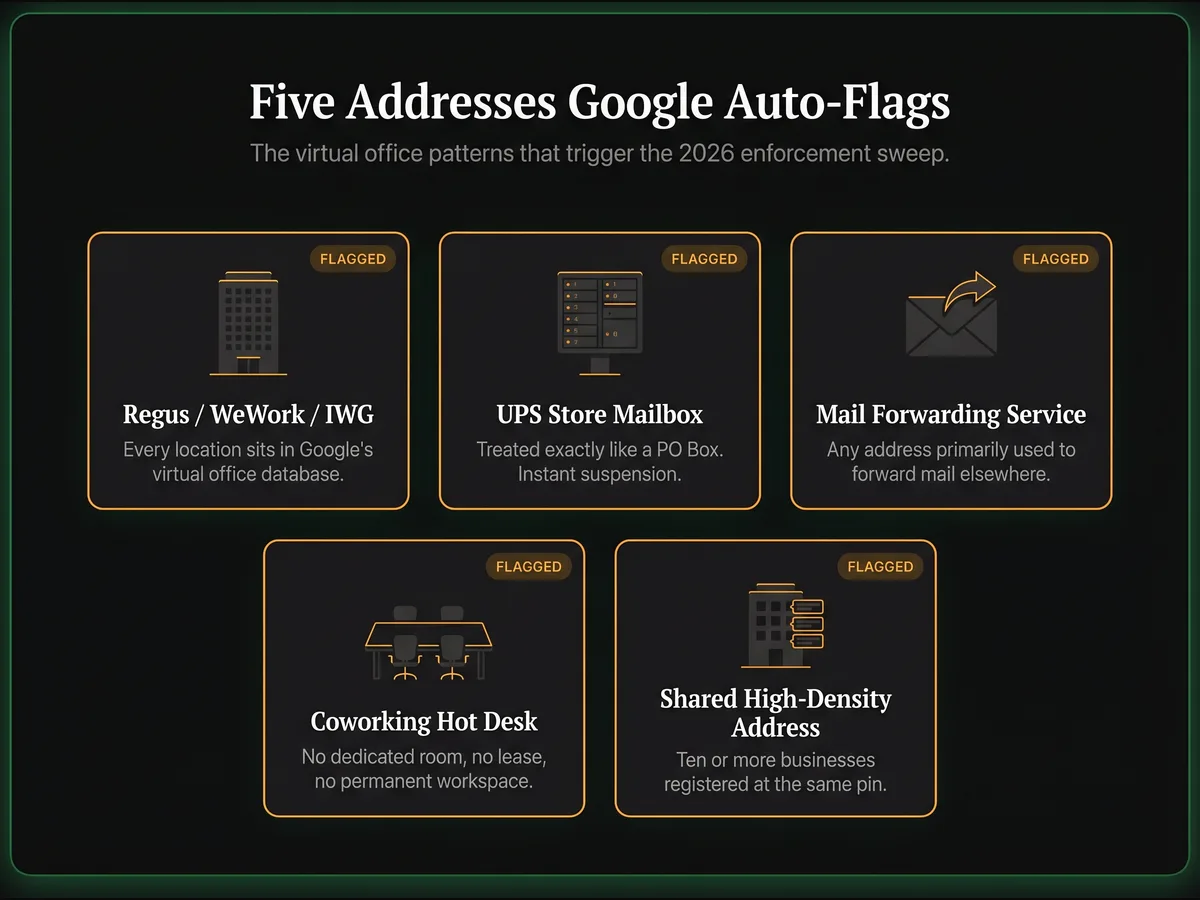
Addresses That Get Flagged
- Regus/WeWork/IWG locations: Flagged automatically. Google knows every location.
- UPS Store addresses: Instantly flagged. Google treats these like PO Boxes.
- Mail forwarding services: Any address primarily used for mail forwarding.
- Co-working hot desks: If you don't have a dedicated, permanent space, it doesn't qualify.
- Addresses with 10+ businesses registered: Google's systems flag these for review.
Your Recovery Options
Option 1: Switch to a Legitimate Address
Move to a real commercial office, even a small one. Get a lease, utility bill, and business registration updated. This is the fastest path to reinstatement — usually 5-7 days with proper documentation.
Option 2: Use Your Home Address
If you run a home-based business, you can use your home address. If clients never visit, convert to a Service Area Business and hide your address from the public — or read our SAB suspension recovery guide if you're already flagged.
Option 3: Get a Dedicated Co-Working Office (with caveats)
Not a hot desk. A dedicated, private office with your business name on the door, a real lease in your business's name, and — critically — staffed presence during your posted hours. Google's representation guidelines require that you be "staffed during posted hours" at the listed address. A dedicated desk you visit twice a week does not meet that bar, even if the door plate has your name on it. If you can't staff the space during your posted hours, switch to a Service Area Business and hide the address instead.
Virtual Office vs Real Office: What Google Accepts
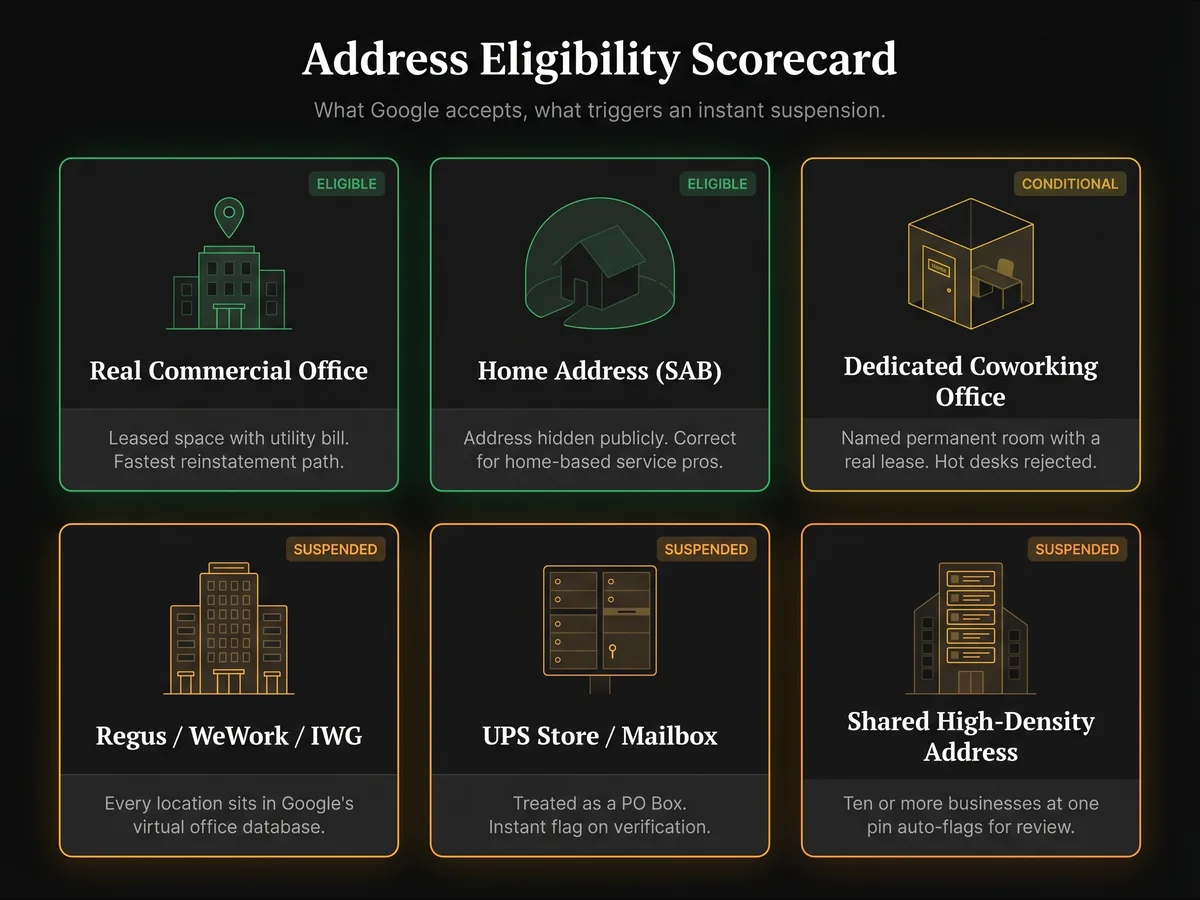
Not all office arrangements are equal in Google's eyes. This table shows exactly what qualifies and what triggers a suspension.
| Address Type | Google Eligible? | Notes |
|---|---|---|
| Real commercial office (leased) | Yes | Fastest reinstatement path. Lease + utility bill needed. |
| Home address (home-based business) | Yes | Can hide address if no customers visit. Use SAB configuration. |
| Dedicated co-working private office | Sometimes | Must be named, permanent space with lease. Hot desks = rejected. |
| Regus / WeWork / IWG virtual address | No | Google has every location in their database. Auto-suspended. |
| UPS Store / mailbox service | No | Treated as PO Box. Instant flag. |
| Shared address (10+ businesses) | No | High-density shared addresses are auto-flagged for review. |
Step-by-Step Recovery
- Step 1: Secure a compliant, staffed address (home, real office, or dedicated co-working office you can actually staff during posted hours)
- Step 2: Update your business registration with the new address so the state record matches your GBP
- Step 3: Assemble Google's four accepted evidence categories (per support.google.com/business/answer/4569145) — see our reinstatement documents checklist: business registration, business license, tax certificates, and utility bills for the new address
- Step 4: Take photos of your business signage and workspace at the new address as supporting extras (not part of the four accepted types)
- Step 5: Submit a reinstatement appeal. Prep your files before opening the evidence-upload form — it may time out after a period of inactivity, but Google does not publish a 60-minute deadline. The appeal flow has four steps with a 25-day cooldown — there's no fixed cap — but each step lands harder when the prior step is solid (read this if your first appeal was denied). Do not create a duplicate profile while your appeal is under review — Google explicitly bans this.
Prevention Tips
- Never use a virtual office address on Google Business Profile — cross-check our suspension prevention checklist quarterly
- If you're a service business, use SAB configuration and hide your address
- If you need a professional address, get a real office or use your home
- Keep all business registrations updated when you move — run a monthly compliance audit to catch drift
A Real Virtual Office Recovery Example
An Austin immigration law firm I helped in February 2026 had operated for three years on a Regus address at Lamar Boulevard. They had never heard from Google until the 2026 enforcement sweep hit their pin in early February — profile suspended overnight, 146 five-star reviews frozen, and the lead pipeline stopped dead inside 48 hours.
The owner's instinct was to appeal with the Regus address still on the profile. I talked her out of it. Every appeal submitted with a virtual office still listed gets auto-denied inside an hour — Google's classifier looks at the address before it looks at the documents. So we moved first, appealed second.
She took a tiny 120 sq ft private office at a nearby executive suite — named door, real lease, utility account in the firm's name. We updated the Texas state registration to match, pulled a fresh utility bill, and photographed the signage, the door plate, and the workspace with a morning timestamp. Total prep: six days.
The appeal was three sentences: we've moved to a permanent named office, here are five documents that prove it, please reinstate. The profile came back on day 6, all 146 reviews intact. She kept the same pin, the same URL, the same history — see our full law firm recovery case study for a longer walkthrough. The lesson repeats on every virtual office case I handle — move first, then appeal. Never the reverse.
Frequently Asked Questions
How does Google know I'm using a virtual office?
Can I use a co-working space address for my GBP?
What if I work from home but don't want to show my home address?
Can I get reinstated while still using a virtual office address?
How long does virtual office suspension recovery take?
Related Articles
New GBP recovery playbooks, straight to your inbox. No spam.
Suspended GBP? I've reinstated 600+ — 95% success.
I’ve recovered 600+ profiles across 60+ countries. Let me look at yours for free — most assessments take under 24 hours.

Google Business Profile Recovery Specialist
Independent Google Business Profile recovery consultant specializing in suspensions, soft suspensions, and reinstatement appeals. Since 2019, recovered 600+ GBP profiles across 60+ countries — from solo tradespeople to multi-location law firms and healthcare groups. Former Upwork Top Rated freelancer (200+ completed contracts, 5-star average) now consulting direct. Research informed by Sterling Sky (Joy Hawkins), Local Search Forum, and daily work inside Google's Business Profile Community. Every case study and recovery playbook on this site is drawn from real client work — no theory, no AI-generated filler.