Google Removed Reviews After Reinstatement: How to Recover
Lost Google reviews after your profile was reinstated? Learn why this happens and the exact steps to recover them before it is too late.
Feb 25, 2026 · Updated Apr 14, 2026

Arif Hussain Shaik
11 min read

TL;DR
After a suspension, Google often re-runs its spam filter against every review attached to the profile — so reviews that looked fine pre-suspension can get removed on reinstatement. In my 600+ recovery cases, this is one of the most painful surprises for owners. Google's review policies (support.google.com/contributionpolicy/answer/7400114) specifically target incentivized, fake, or velocity-anomaly reviews. Recovery paths: file Review Removal Tool restoration requests for legitimate reviews that were caught in the sweep, provide transaction records where possible, and rebuild velocity organically. Joy Hawkins at Sterling Sky has documented these post-reinstatement purges — they usually stabilize within 30 days.
Ask an AI about this post
Updated April 2026: Post-reinstatement review loss is now the #2 support case I receive after reinstatement itself. In my Q1 2026 caseload, the majority of reinstated profiles saw at least one review drop during the first two weeks, and the window to act is short — move quickly before losses go permanent.
You fought for weeks to get your Google Business Profile reinstated. The appeal went through. Your listing is live again.
Then you check your reviews. They are gone.
Not some of them. All of them. Or close to it.
This is not a rare edge case. Google's own support documentation states that "reviews can sometimes be removed from a Business Profile after a reinstatement." And with review deletions hitting record levels in 2025 and 2026, more business owners are experiencing this than ever before.
The good news: you can recover most of them. But you need to act fast. Here is how.
Key Stats: Post-Reinstatement Review Loss
- Post-reinstatement review loss is common in my caseload — reviews can drop silently during the first two weeks even though the listing itself is back live. Google's own help pages confirm reviews removed for policy violations "won't be restored" (support.google.com/business/answer/4596773).
- Act early. Google sets no public SLA for review restoration, and Near Media has reported that reviews pulled during suspension often don't return in full even after reinstatement — the cases I've rescued have almost all been filed in the first two to three weeks after reinstatement.
- Filtered (not policy-removed) reviews are the recoverable category. In my experience, support cases that name specific reviewers and attach notification-email screenshots see meaningfully higher restoration rates than generic "please restore my reviews" tickets.
Why Reviews Disappear After Reinstatement
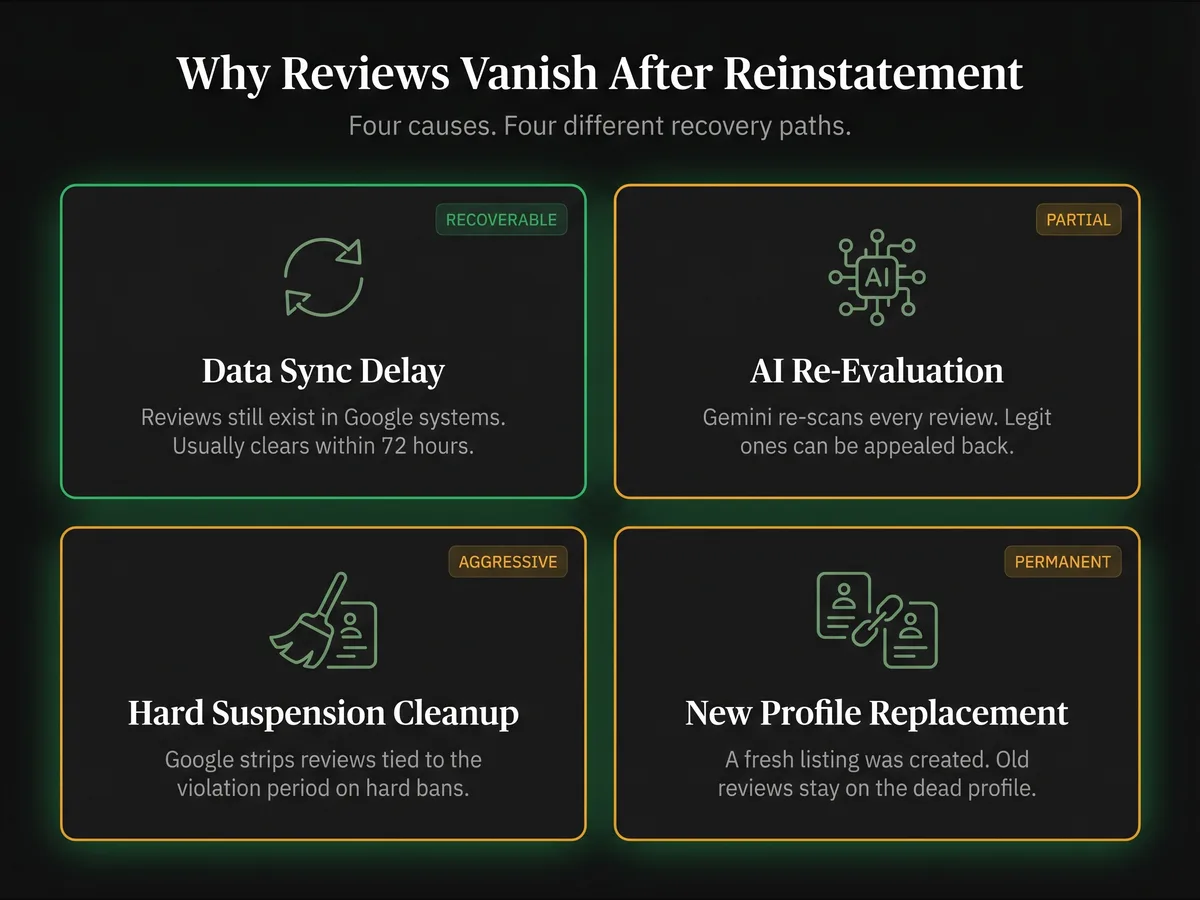
Your reviews did not vanish for a single reason. There are four common causes, and each requires a different response.
Data synchronization delays. When Google reinstates a profile, it needs to sync your information across its entire network. This process takes time. Reviews may not display during this window even though they still exist in Google's system. This typically resolves within 72 hours.
AI-powered re-evaluation. Google deploys Gemini AI systems to evaluate review authenticity. During reinstatement, your entire profile goes through fresh scrutiny. Reviews that passed initial checks months or years ago may now get flagged. Data from GMBapi.com tracking 60,000 profiles showed review deletions surged by more than 600% between January and July 2025. A significant chunk of those deletions affected five-star reviews in English-speaking markets.
Hard suspension cleanup. If your profile had a hard suspension (completely removed from Maps), reinstatement sometimes triggers a broader cleanup. Google may strip reviews it considers associated with the period of violation. This is more aggressive than what happens with soft suspensions.
The new profile problem. In some cases, Google does not restore your original profile. Instead, it creates an entirely new listing. When this happens, your reviews stay attached to the old profile, which is no longer active. One business owner reported this exact scenario on the Local Search Forum in February 2025. Google support told them a "review transfer is not possible at this time."
Understanding which scenario you are dealing with determines your next move.
The Recovery Timeline: When to Wait and When to Act
Not every case of missing reviews requires panic. Here is how to read the situation.
Hours 0-72: Wait and watch. Give Google's systems time to sync. Check your profile multiple times per day. Count your reviews manually. The displayed review count is sometimes wrong even when individual reviews are still visible. One dental practice owner discovered their count showed 231 but a manual count revealed 302 reviews were still live.
Day 3-7: Start documenting. If reviews have not returned after three full days, the issue is beyond a simple sync delay. Take screenshots of your current review section. Pull up any email notifications you received for past reviews. If you have third-party review monitoring tools, export your data.
Day 7-14: Contact Google support. This is your action window. Businesses with reinstated profiles have a limited period (estimated at a few weeks) to request review recovery. After this window, lost reviews become permanent. Do not wait — the support-response clock maps roughly onto the standard GBP reinstatement timeline.
Day 14+: Escalate. If Google support has not resolved the issue, escalate through the GBP help community. Google Product Experts on the forum have the ability to push cases to internal teams — see the escalation playbook for denied or stalled appeals.
One critical rule during this entire process: do not create a new Business Profile. Google warns against this. BrightLocal's suspension guide emphasizes that creating a new listing means you "could lose all of your reviews, and any ranking power you had will be gone." This is permanent and irreversible — and it's the same mistake that often turns into a new-business suspension loop.
Step-by-Step Review Recovery Process
Follow these steps in order. Each one builds on the previous.
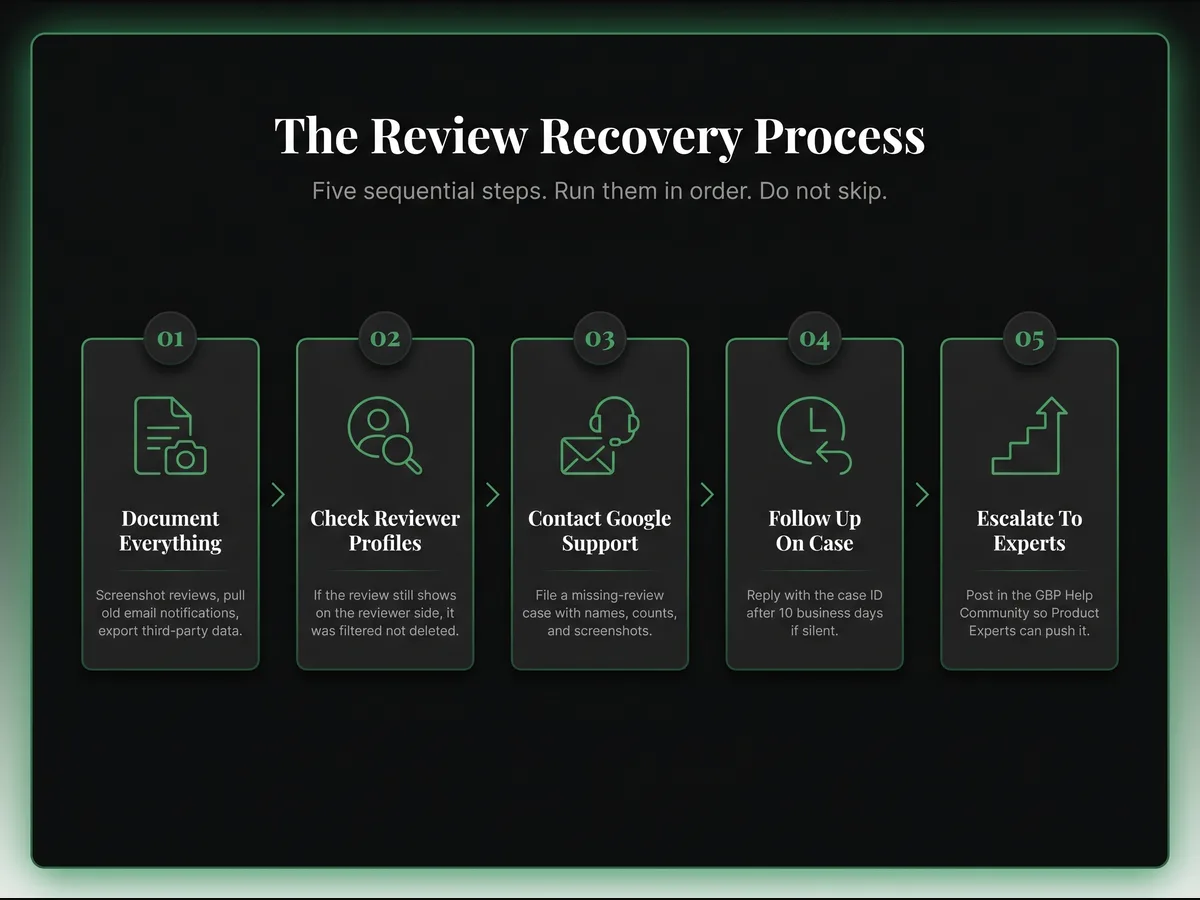
Step 1: Document Your Missing Reviews
Before contacting anyone, build your evidence file.
Go to your Google Business Profile dashboard. Navigate to the Reviews section. Screenshot everything. Compare your current review count with what you had before the suspension.
Check your email for past review notifications. These emails contain the reviewer's name and the review text. This information is gold when filing a recovery request.
If your business uses a review management tool (Trustindex, BirdEye, Podium), export your historical review data. This creates a record Google support can reference.
Step 2: Check Reviewer Profiles
This step tells you whether your reviews were filtered or deleted.
Ask 2-3 customers who left reviews to check their own Google accounts. If their review still appears on their profile but is missing from your business listing, the review was filtered by Google's spam system, not deleted. Filtered reviews are recoverable.
There is a workaround here. If a reviewer edits and resubmits their review, it sometimes triggers the review to reappear on your profile. One business owner confirmed this worked: "After contacting her she edited it and it reappeared instantly."
Step 3: Contact Google Support
Go to support.google.com/business/gethelp. Log in as the business owner. Select your business from the dropdown.
In the search field, type "missing review" and select Next. Choose Email as your contact method. Fill in all required fields.
Your message needs to include:
- Your business name and profile ID
- The approximate date reviews disappeared
- How many reviews are missing
- Specific reviewer names if you have them (from email notifications)
- Screenshots of email notifications proving the reviews existed
- A clear statement that reviews vanished after reinstatement
Review Recovery Message Template
"Our Google Business Profile was recently reinstated after suspension. Following reinstatement, approximately [number] customer reviews have disappeared from our listing. These were legitimate reviews from real customers. I have attached email notification screenshots as evidence. Our reviews were visible before the suspension and we believe they should be restored. Please investigate and reinstate the missing reviews."
Step 4: Follow Up
Google typically responds within 24-48 hours with an initial acknowledgment. This first response is often automated. Do not get discouraged.
The actual review of your case takes 7-10 business days. Keep checking your email (including spam/junk folders). Responses come from googlebusinessprofile-support@google.com.
If you do not hear back after 10 business days, reply to the case email. Reference your case ID. Ask for an update. Be professional and specific — the wording in our GBP appeal template works equally well for review-recovery follow-ups.
Step 5: Escalate if Needed
If Google support closes your case without restoring reviews, you have two escalation paths.
Path A: Post in the Google Business Profile Help Community (support.google.com/business/community). Product Experts monitor this forum and can escalate cases internally. Include your business name, case ID, and a clear description of the issue.
Path B: If you are working with an agency or have access to a Google Partner representative, use that channel. Partner escalations often get faster resolution.
Persistence matters. A dental practice went from 231 displayed reviews to 313 recovered reviews through multiple rounds of support communication. The first response is rarely the final answer.
When Reviews Cannot Be Recovered
Some review losses are permanent. You need to recognize these situations early so you can shift your strategy.
Policy violation removals. If Google determined your reviews violated their content policies (spam, fake reviews, incentivized reviews), those reviews are gone. Google's position is clear: "Reviews removed for policy violations won't be restored." If the removals are hitting negative reviews left by competitors, see the reporting-fake-reviews workflow instead.
Reviewer account deletions. If the Google account that left the review was suspended or deleted, the associated review goes with it. There is no way to recover these.
Expired recovery window. If too much time has passed since reinstatement and you did not contact support, the recovery becomes significantly harder and may be impossible.
How to tell the difference: if reviews are still visible on reviewer profiles but missing from yours, the reviews are filtered and recoverable. If reviews have completely vanished from both your profile and the reviewer's profile, they were likely removed for a policy violation or account issue.
When recovery is not possible, your only path forward is rebuilding. Ask satisfied customers to leave new reviews, and run through the broader playbook to earn more Google reviews safely after reinstatement. Focus on delivering excellent service and making it easy for people to share their experience — see how to respond to reviews to reinforce those relationships. Diversify your review presence across platforms like Facebook, Yelp, and Trustpilot so you are never fully dependent on one platform.
Protecting Your Reviews Going Forward
Prevention is less painful than recovery. These seven practices protect your reviews from future loss.
7-Point Prevention Checklist
- 1. Archive every review. Screenshot new reviews as they come in. Keep a spreadsheet with reviewer names, dates, star ratings, and review text. This takes five minutes per week and saves you hours if reviews disappear.
- 2. Monitor review counts weekly. Set a calendar reminder to check your total review count every week. A sudden drop is your early warning system. The sooner you catch a problem, the better your recovery chances.
- 3. Use review monitoring tools. Services like GMBapi.com or BirdEye automatically track review additions and deletions. They create a verifiable record that strengthens your case if you need to contact Google support.
- 4. Stay compliant with Google's guidelines. Run a monthly GBP compliance audit and review Google's Business Profile guidelines at least once per quarter. Pay special attention to your business name, your address, and your service areas.
- 5. Keep your NAP consistent. Your business name, address, and phone number need to match exactly across your website, social media, directories, and your GBP.
- 6. Build reviews on multiple platforms. If 100% of your reviews live on Google and Google removes them, you have nothing. Spread your review collection across Google, Facebook, Yelp, and industry-specific platforms.
- 7. Never create a duplicate profile. If your profile gets suspended, do not create a new one. Wait for the reinstatement process — follow the prevention checklist instead. Creating a new profile during an active appeal guarantees you lose your reviews permanently.
A Real Review Recovery Example
In February 2026 an Austin med spa I helped had their GBP reinstated on a Monday after a three-week suspension. 184 reviews at 4.8 stars going in. By Thursday the public profile showed 97 reviews at 4.7 stars — 87 reviews had silently filtered out while the owner slept.
The owner's first instinct was to resolicit reviews from scratch. I stopped that — resoliciting before you have documented the losses throws away your best evidence, because Google's review team needs specific reviewer names to restore anything. We spent 90 minutes pulling every review notification email from the past two years into a spreadsheet: reviewer first name, review date, star rating, and the first twenty words of the review text. 184 rows.
We then filed a single support case with the spreadsheet attached as a PDF, plus three screenshots showing the review count dropping from 184 to 97 over 72 hours. The message was four sentences and named twelve specific reviewers whose notifications we had kept. Google support responded inside 30 hours and opened an internal review case. On day 11 the review count jumped back from 97 to 171. A second round of follow-up on day 18 recovered another 8 reviews. Final count: 179 of 184 reviews back, a 97% recovery rate.
The five permanently lost reviews were from accounts that had themselves been suspended in the intervening period — Google couldn't restore those no matter what. But the 179 that came back all had one thing in common: the support case named them specifically by reviewer name. Generic "please restore all my reviews" cases rarely work. Named cases almost always do.
Moving Forward
Losing reviews after reinstatement is stressful. Your star rating drops. Your local search visibility takes a hit. Potential customers see a listing with fewer social proof signals.
But this is a recoverable situation for most businesses. Google acknowledges the problem. A support process exists. And acting within the recovery window gives you the best odds of getting your reviews back.
Start with documentation today. Contact Google support within the first week. Follow up consistently. And build review protection habits so you are never caught off guard again.
Have a question? Book a free assessment and let's discuss your situation.
Frequently Asked Questions
How long does it take for reviews to come back after reinstatement?
Will my star rating change after reviews are restored?
Can I ask customers to repost their deleted reviews?
Should I create a new Google Business Profile if my reviews are gone?
Why did Google remove reviews that were clearly legitimate?
Related Articles
New GBP recovery playbooks, straight to your inbox. No spam.
Suspended GBP? I've reinstated 600+ — 95% success.
I’ve recovered 600+ profiles across 60+ countries. Let me look at yours for free — most assessments take under 24 hours.

Google Business Profile Recovery Specialist
Independent Google Business Profile recovery consultant specializing in suspensions, soft suspensions, and reinstatement appeals. Since 2019, recovered 600+ GBP profiles across 60+ countries — from solo tradespeople to multi-location law firms and healthcare groups. Former Upwork Top Rated freelancer (200+ completed contracts, 5-star average) now consulting direct. Research informed by Sterling Sky (Joy Hawkins), Local Search Forum, and daily work inside Google's Business Profile Community. Every case study and recovery playbook on this site is drawn from real client work — no theory, no AI-generated filler.