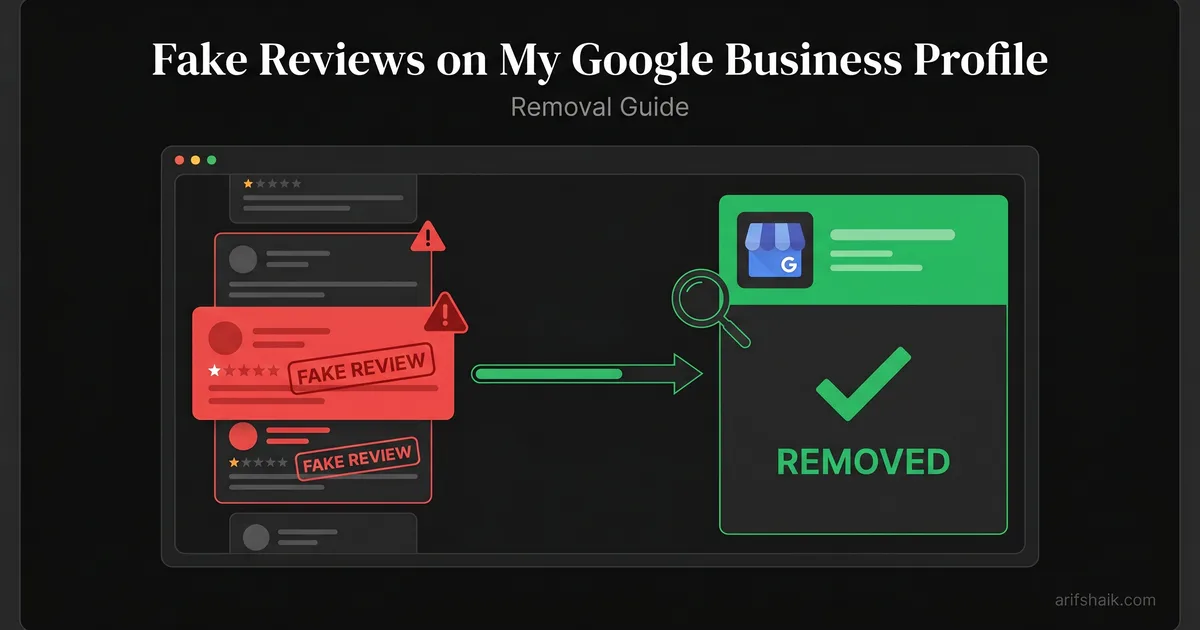
Fake Reviews on My Google Business Profile: Removal Guide
Fake reviews on your GBP? Learn which reviews Google will remove, the step-by-step removal process, and what to do when Google won't act.
Apr 6, 2026 · Updated Apr 23, 2026

Arif Hussain Shaik
7 min read
TL;DR
Google removes fake reviews that clearly violate policy — spam accounts, off-topic reviews, conflict-of-interest reviews, and prohibited content. Real-looking negative reviews from established accounts are the hardest to remove. Removal success depends on specific evidence: account age, review history, transaction records, and competitor cross-references — not on generic 'this review is fake' claims.
Ask an AI about this post
The Hard Truth About Fake Review Removal
Google will remove fake reviews — but not on demand and not automatically. The removal process requires you to identify which reviews violate policy, submit a formal request with evidence, and often follow up multiple times before action is taken. Some fake reviews that are clearly inauthentic will stay up for weeks. A small percentage will never be removed despite your best efforts. See the step-by-step fake-review reporting workflow for the exact form paths.
This guide gives you the complete, honest process: which reviews Google will act on, how to submit removal requests that actually work, what evidence to include, how to escalate when the standard process fails, and what to do when removal isn't possible. After handling hundreds of cases involving deleted or disputed reviews, I've identified the exact approaches that produce results — and the ones that waste your time.
Which Fake Reviews Google Will Remove
Google removes reviews that violate its review policies — the official prohibited and restricted content policy and the incentivized reviews policy are the two to know. Understanding which categories of fake reviews are removable — and which are borderline — helps you prioritize your removal efforts and frame your requests correctly.
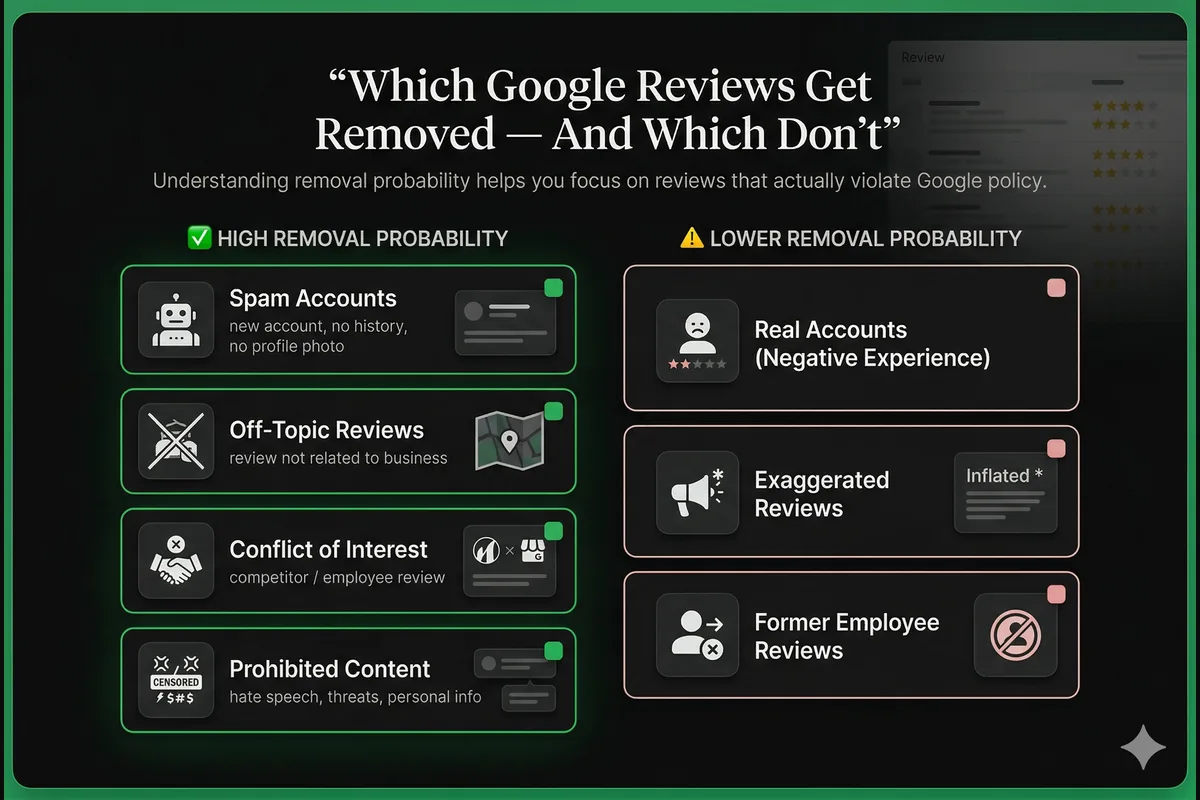
High Removal Probability
- Spam reviews: Reviews from accounts with no profile photo, no other reviews, and accounts created recently (within days or weeks of the review). These match the technical profile of fake account farms and are the typical trigger behind a fake-reviews suspension.
- Off-topic reviews: Reviews that describe a business, service, or experience completely unrelated to your actual business. "Their food was terrible" for a plumbing company, for example.
- Conflict of interest reviews: Reviews that are demonstrably from competitors, employees, or people with an obvious financial stake in your rating. If the same account leaving you a 1-star review is leaving a 5-star review for a direct competitor, this qualifies — often the early sign of a coordinated review bombing attack.
- Prohibited content: Reviews containing hate speech, explicit threats, personal information, or other content that violates Google's core content policies are removed regardless of whether the reviewer is real — the same content triggers that appear in many GBP suspension categories.
Lower Removal Probability
- Negative reviews from real accounts: If the account has a review history, a profile photo, and reviews of other businesses — even if you have no record of them as a customer — Google is less likely to remove the review. These require stronger evidence (e.g., proof of no transaction).
- Exaggerated or embellished reviews: A real customer who exaggerates a minor issue into a dramatic negative review is not a "fake review" in Google's policy sense. These are very difficult to remove unless they contain provably false factual statements.
- Reviews from unhappy former employees: These are technically bias-based but Google doesn't always act on them. You'll need strong evidence of employment relationship and motivation.
Step-by-Step: How to Remove a Fake Review
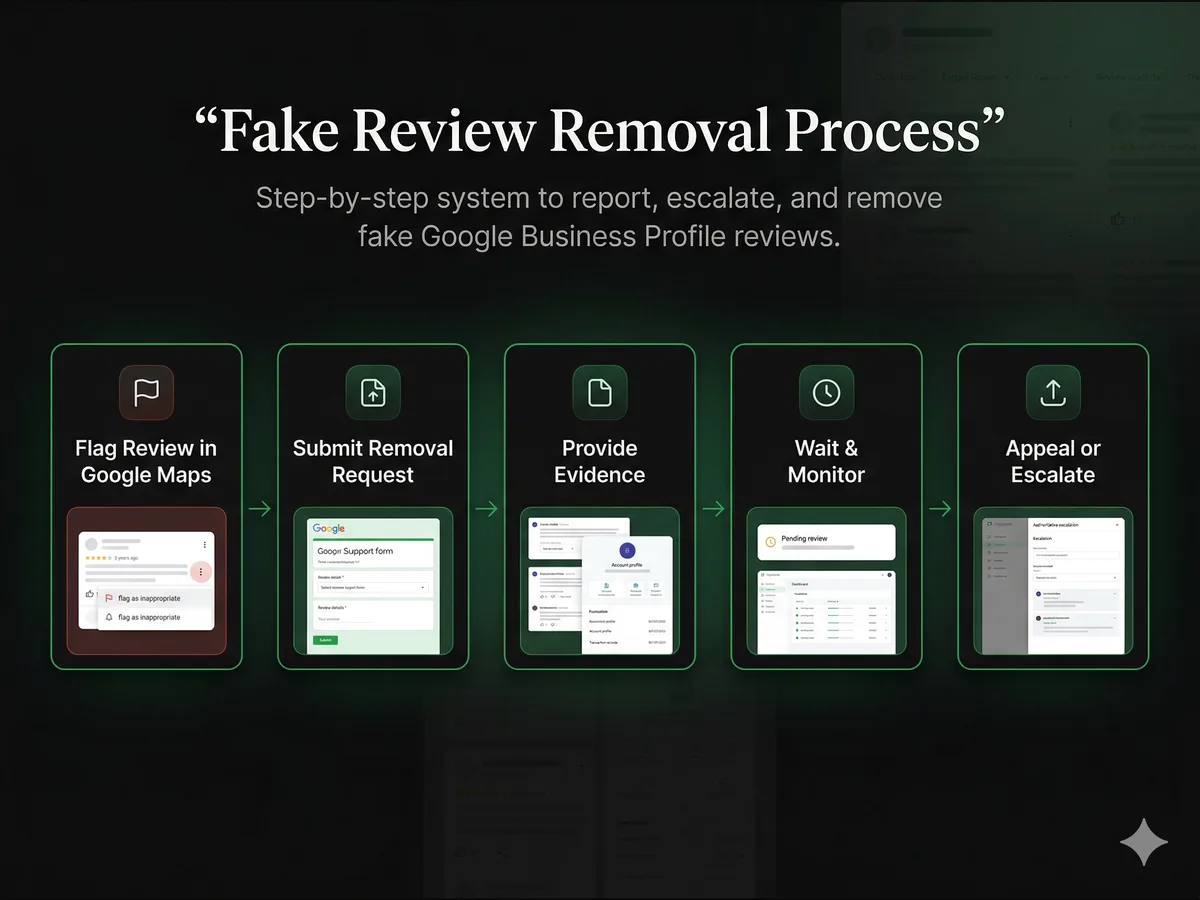
Step 1: Flag the Review Directly in Google Maps
Go to your GBP listing in Google Maps. Find the review you want to report. Click the three-dot menu (⋮) to the right of the review and select "Flag as inappropriate." You'll be prompted to select a reason:
- Spam or fake: Use this for suspected fake accounts or purchased reviews.
- Off topic: Use this when the review doesn't describe your business.
- Conflict of interest: Use this when the reviewer has an obvious competing or personal interest.
- Profanity: Use this for reviews containing explicit or offensive language.
Flagging alone rarely removes reviews immediately — it enters the review into Google's moderation queue. For borderline cases, the flag may be reviewed and dismissed. Flagging is step one, not the complete solution.
Step 2: Submit a Formal Removal Request via the Reviews Management Tool
For fake reviews that don't get removed through flagging, submit a formal request through Google's Reviews Management Tool — this is the dedicated channel for review removal requests, separate from the generic help form.
In your request, be specific. Include:
- The reviewer's name and the date the review was posted
- The reason you believe it's fake (account created recently, no review history, no record in your customer database, geographically inconsistent)
- Screenshots of the reviewer's profile showing account age and review history
- Any evidence the reviewer has never been your customer (transaction records, booking history, service area records)
Step 3: Monitor Status in the Reviews Management Tool
In my consultant experience, formal requests typically see a first response within 3-7 business days — this is an Arif observation from 600+ cases, not a Google-published SLA. Track progress in the Reviews Management Tool, which shows three statuses: Decision pending, Report reviewed—no policy violation found, or Escalated—check email for updates. Reviews are sometimes removed without an email notification, so check your profile directly if the tool shows no change. Timelines here are similar to a standard reinstatement window: patience and clean evidence beat repeated re-submissions.
Step 4: Appeal a Denied Removal (One-Time)
If your removal request is denied, you have one formal appeal per review through the Reviews Management Tool — you can appeal up to 10 reviews simultaneously in a single submission. A denial doesn't mean permanent rejection — it means your initial evidence wasn't compelling enough. Add new, stronger evidence: account creation dates, transaction records, or competitor cross-references. After using your one appeal, escalate to GBP support directly with your case reference numbers.
Contacting Google Business Profile Support Directly
For campaigns of multiple fake reviews (review bombing), or when standard removal requests have been denied despite strong evidence, contact Google Business Profile support directly through the official help center. Request a manual review escalation for your case.
When contacting support, be concise and evidence-focused. "I have received [X] fake reviews within [timeframe] from accounts that show signs of coordinated spam activity. I have submitted formal removal requests with documentation. I am requesting an escalation of my case for manual review." Include your case reference numbers from previous submissions.
For cases involving review bombing by a competitor, see the complete review bombing recovery guide which covers both the Google removal process and legal options. Use professional response templates while the removal case is in flight.
When Google Won't Remove the Review
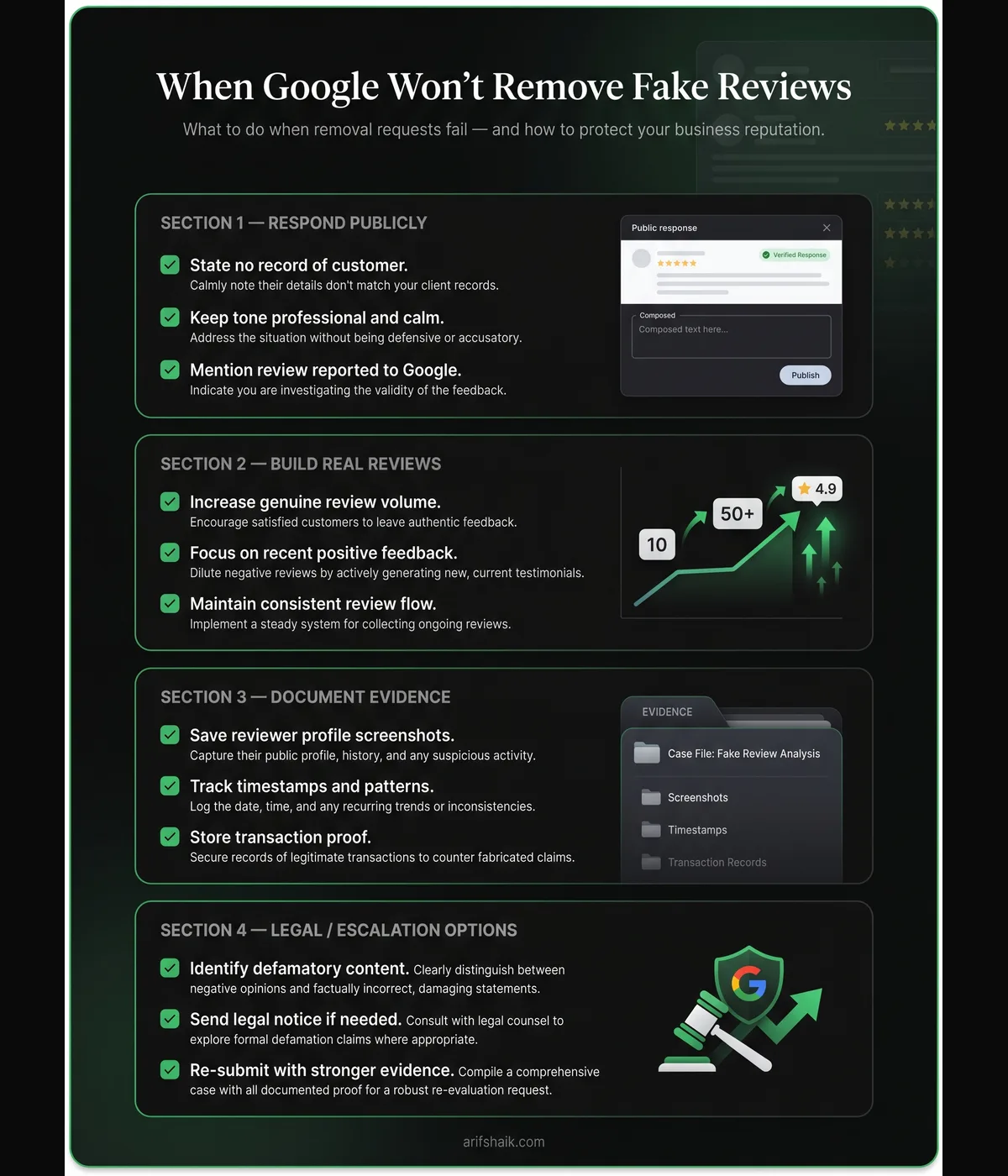
Some fake reviews — particularly those from accounts with any review history — will survive Google's removal process. When that happens, here's what you can do:
- Respond publicly with evidence. A response that notes "We have searched our records and have no record of serving this customer. We have reported this review to Google." informs potential customers reading the review that you dispute its legitimacy without being aggressive — see the review response templates.
- Build genuine reviews to dilute the impact. Fake negative reviews have less impact on your rating when your total review count is high and your average is strong. A 1-star review among 50 four-and-five-star reviews has minimal impact. See the guide to getting reviews legitimately and rebuilding reviews post-reinstatement.
- Pursue legal options if you have clear evidence. Demonstrably false factual statements in a review can constitute defamation. A cease and desist letter from an attorney is often enough to prompt the reviewer to remove their own review.
- Document everything for future re-submission. If the fake review stays up and you acquire additional evidence later (such as identifying the reviewer as a competitor's employee), you can resubmit the removal request with the new evidence.
Preventing Fake Reviews in the Future
There is no way to completely prevent fake review attacks, but you can reduce your vulnerability:
- Maintain a high volume of genuine positive reviews so isolated fake negatives have less impact on your overall rating.
- Monitor your review count weekly — catching a bombing campaign early minimizes the damage window.
- Respond to all reviews promptly so your profile always shows active, professional management.
- Set up Google Alerts for your business name so you're notified of new online mentions quickly.
- Run monthly compliance audits to ensure your profile is clean — a profile with strong legitimacy signals is harder to damage. See the monthly compliance audit guide and the broader suspension prevention checklist.
- Pair your review strategy with a healthy GBP optimization checklist and a periodic full profile audit so legitimate customers choose you over competitors with fake reviews.
Frequently Asked Questions
How many times can I request removal of the same review?
Can I see who flagged a review for removal on my profile?
My competitor is leaving positive reviews on their own business. Is that a violation I can report?
Does having fake negative reviews affect my GBP suspension risk?
Can a removed review come back?
Related Articles
New GBP recovery playbooks, straight to your inbox. No spam.
Suspended GBP? I've reinstated 600+ — 95% success.
I’ve recovered 600+ profiles across 60+ countries. Let me look at yours for free — most assessments take under 24 hours.

Google Business Profile Recovery Specialist
Independent Google Business Profile recovery consultant specializing in suspensions, soft suspensions, and reinstatement appeals. Since 2019, recovered 600+ GBP profiles across 60+ countries — from solo tradespeople to multi-location law firms and healthcare groups. Former Upwork Top Rated freelancer (200+ completed contracts, 5-star average) now consulting direct. Research informed by Sterling Sky (Joy Hawkins), Local Search Forum, and daily work inside Google's Business Profile Community. Every case study and recovery playbook on this site is drawn from real client work — no theory, no AI-generated filler.