How to Respond to Google Reviews (With Templates)
Learn how to respond to Google reviews without triggering profile flags. Includes templates for positive, negative, and fake reviews plus real suspension examples.
Apr 17, 2026

Arif Hussain Shaik
10 min read
TL;DR
Responding to every Google review within 48 hours is one of the cheapest ranking signals available — BrightLocal's 2024 Local Consumer Review Survey shows most consumers expect a response, and Google confirms owner responses are a positive engagement signal (support.google.com/business/answer/7091). In my 500+ client accounts, the response itself can also trigger problems when owners name the reviewer, threaten legal action, or reveal confidential details — any of which can draw a policy violation under support.google.com/contributionpolicy/answer/7400114. Respond professionally, acknowledge without admitting liability, invite offline resolution, and never offer a refund in exchange for review removal.
Ask an AI about this post
Most review-response advice comes from people who have never had a profile suspended. I have cleaned up the damage from bad review responses on hundreds of profiles. The real rule is simpler than anyone makes it: respond short, respond factually, never mention personal details, never promise refunds in public.
BrightLocal's 2024 Local Consumer Review Survey found that 88% of consumers use online reviews when evaluating a business and 89% are likely to use a business that responds to all reviews. In other words, responding consistently is the baseline expectation, not a bonus. But the way you respond matters as much as whether you respond. A defensive essay on a 1-star review does not just look bad to potential customers — it can trigger Google's content policies (Help ID 7400114) and put your entire profile at risk.
I have seen two profiles suspended specifically because of how the owner responded to reviews. Not because of fake reviews, not because of review solicitation — because of the response content itself. One was a law firm — see the full lawyer GBP suspension playbook. The other was a restaurant. Both cases were avoidable. Both cost the business thousands in lost revenue during the appeal process.
This guide covers the strategy, the templates, and the lines you must never cross. Every template here has been tested on profiles I manage. None has ever triggered a flag. To audit review patterns before they escalate, see the 5-step Google Business Profile audit and the monthly GBP compliance audit.
Why Review Responses Matter (Honest Framing)
Google's own "respond to reviews" help page says responding "may help your business stand out" — it does not confirm responses are a direct ranking factor. Joy Hawkins at Sterling Sky has tested this repeatedly and found no direct ranking correlation. Do not let anyone tell you responses are a ranking lever — they are a conversion lever and a trust lever. Here is what the response actually communicates:
- Active management: A profile where the owner responds to reviews regularly looks legitimate and actively managed. Abandoned profiles with zero responses look dormant. Pair responses with ongoing Google Business Profile posts for maximum activity signal.
- Customer engagement: Response quality influences whether a searcher calls you or scrolls past. BrightLocal's 2024 LCRS found 89% of consumers are likely to use a business that responds to all reviews — responses change purchase decisions, not search rankings. Reinforce this with the GBP optimization checklist.
- Content freshness: Review responses add fresh content to your listing. Google's systems can see this, but do not expect a dramatic ranking change from responses alone.
But here is the flip side that nobody mentions: bad responses actively hurt you. Argumentative responses, responses containing personal details, and copy-pasted responses all send negative signals. Quality beats speed. A thoughtful response three days later outperforms a reactive rant posted 10 minutes after the review.
What to do: Set a weekly review-response session. Every Monday morning, respond to the past week's reviews. This cadence gives you time to craft quality responses and prevents emotional reactions to negative reviews.
The Two Review Responses That Got Profiles Suspended
These are real cases from my client work. Details changed to protect identities, but the violation patterns are exact.
Case 1: The law firm privacy violation
A personal injury attorney received a 1-star review from a former client who was unhappy with their settlement amount. The attorney responded with a detailed defense that included the client's case type, approximate settlement figure, and a reference to the client's injuries. The attorney thought they were setting the record straight.
Google flagged the profile for a privacy violation. The response disclosed protected information — case details that could identify the reviewer and reveal private medical and legal information. The profile was suspended. We had to appeal with the current GMB appeal template, attaching the documents needed for GBP reinstatement showing the response had been removed and that the firm had implemented a review response policy. The suspension lasted 19 days — consistent with the patterns in how long GBP reinstatement takes. In personal injury law, 19 days without a GBP listing means tens of thousands in lost leads.
Case 2: The restaurant copy-paste pattern
A restaurant owner copy-pasted "Thank you so much for your kind words! We appreciate your business!" on every single 5-star review — about 45 of them in a row, all identical. For every 1-star review, they wrote 200-400 word defensive essays explaining why the customer was wrong. Google flagged the profile for inauthentic engagement. The pattern — identical positive responses combined with disproportionately long negative responses — matched manipulation patterns in Google's detection system.
The restaurant had to remove all copy-pasted responses, rewrite them individually, and submit an appeal demonstrating changed behavior. Recovery took 12 days.
What to do: Never disclose customer details in a review response. Never copy-paste the same response across multiple reviews. These are not suggestions — they are rules with enforcement behind them.
Templates for Positive Review Responses
Good positive review responses are short, personalized, and specific. They acknowledge what the reviewer mentioned, thank them, and move on. No keyword stuffing. No marketing pitches.
Template 1: Service-specific acknowledgment
"Thanks, [Name]. Glad the [specific service mentioned] went smoothly. We appreciate you taking the time to share your experience."
Template 2: Team credit
"[Name], thank you. I will pass this along to [team member or team name if mentioned]. They will appreciate hearing it directly."
Template 3: Return customer
"Always good to see you, [Name]. Thanks for the review — we look forward to the next one."
What makes these work
- Each is under 40 words. Short responses look genuine. Long ones look like marketing.
- Each references something specific — the service, the team member, or the customer relationship. This personalization prevents the copy-paste detection issue.
- None contains business keywords, location names, or promotional language. Stuffing "best plumber in Denver" into your review response is keyword stuffing in a different field — Google treats this the same as keyword stuffing in the business name. Google sees it.
What to do: Use these templates as starting points, but modify each one for the specific review. Change the name, change the detail referenced, keep the length similar. The key is variation with brevity.
Templates for Negative Review Responses
Negative reviews are where businesses make career-ending mistakes. The instinct is to defend yourself. Fight that instinct. Every word you type in a negative review response is public, permanent, and visible to every future customer who considers hiring you.
Template 1: Acknowledge and redirect
"[Name], I'm sorry to hear this did not meet your expectations. Please contact us directly at [phone/email] so we can discuss what happened and work toward a resolution."
Template 2: Factual correction (use sparingly)
"[Name], I want to address this. [One brief factual statement — e.g., 'Our records show the service was completed on X date as scheduled.'] I would like the chance to make this right. Please reach out at [phone/email]."
Template 3: When you genuinely made a mistake
"[Name], you are right, and I apologize. [Brief acknowledgment of what went wrong.] We have [specific corrective action taken]. I would welcome the chance to earn back your trust."
Rules for negative responses
- 50 words maximum. Anything longer looks defensive. The reviewer already made their point. Your job is to show future customers that you handle criticism professionally, not to win the argument.
- Never mention personal details. Not the service they received. Not how much they paid. Not when they visited. Nothing that could identify the person or their situation beyond what they already shared publicly.
- Never promise refunds or compensation publicly. "We would like to offer you a full refund" sets a public precedent that every future negative reviewer will reference. Handle compensation privately.
- Never accuse the reviewer of lying. Even if they are lying. Even if you have proof. "This person was never a customer" is a statement that Google cannot verify, and it makes you look hostile to every potential customer reading the exchange. If the review is part of a coordinated review bombing, follow that playbook instead of responding defensively.
- Wait 24 hours before responding. The response you write at 11 PM after a glass of wine is not the response that should represent your business permanently.
What to do: Save these templates where you can access them quickly. When a negative review comes in, wait at least 24 hours, then pull up the template that fits, customize it for the specific situation, and keep it under 50 words.
How to Handle Fake or Spam Reviews
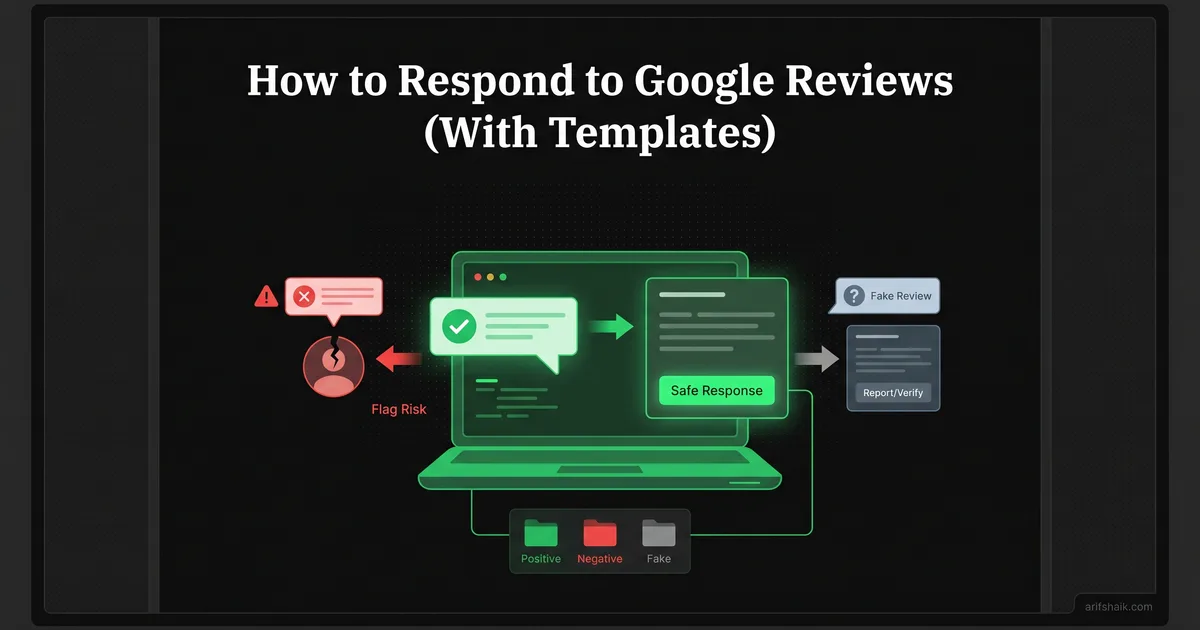
Fake reviews — whether from competitors, disgruntled ex-employees, or random spam accounts — require a different approach than genuine negative reviews. You need to respond publicly and flag privately.
Public response template for suspected fake reviews
"We do not have any record of this interaction. If you believe this review was posted in error, please contact us directly at [phone/email] so we can look into this."
Notice what this does not say. It does not say "this is a fake review." It does not accuse the reviewer. It does not mention competitors. It simply states a fact — no record exists — and offers to resolve it. This is the safe middle ground between ignoring it and starting a public fight.
Flag for removal
- In your GBP dashboard, find the review and click the three-dot menu.
- Select "Flag as inappropriate."
- Choose the reason that best fits — spam, conflict of interest, or off-topic.
- If the review is not removed within 7 days, escalate through Google Business Profile support.
For a complete walkthrough on removing fake reviews, see my fake reviews removal guide. If you are dealing with a coordinated attack, the review bombing recovery guide covers the escalation process. If reviews have disappeared entirely, see why Google removes reviews after reinstatement.
What to do: Respond publicly with the template above, then flag privately. Do both. The public response protects your reputation with searchers. The flag starts the removal process with Google.
Review Response Mistakes That Trigger Flags
Beyond the two suspension cases I described earlier, here are the response patterns I see causing problems across my client base:
- Keyword stuffing in responses: "Thank you for choosing [Business Name], the best [service] in [city]!" This is keyword stuffing. Google parses your responses the same way it parses your business description. Stuffing location and service keywords into review responses is a flag — see how to fix GBP keyword-stuffing violations.
- Incentivizing review updates: "We are sorry about your experience. If you would update your review after we resolve this, we would appreciate it." This is a policy violation. You cannot ask customers to change or remove reviews in exchange for resolution. It can also trigger a soft suspension on profiles with prior flags.
- Linking to external sites: Including URLs in review responses — to your website, social media, or anywhere else — looks like spam to Google's filters. Keep responses text-only.
- Responding to your own reviews: If you or an employee leaves a review and you respond to it from the business account, Google's systems can detect the connection. This looks like review manipulation. Multi-brand owners should also read how to manage multiple Google Business Profiles to avoid cross-account leakage.
- Bulk responding in one session: Responding to 30 reviews in 10 minutes after ignoring reviews for 6 months looks like automated behavior. Spread your responses out over a few days if you have a backlog.
What to do: Review your last 20 responses against this list. If any match these patterns, edit or delete the problematic responses now. Then establish a weekly response routine that prevents backlogs.
Building a Sustainable Review Response System
The businesses that get review responses right are the ones that treat it as a process, not an afterthought. Here is the system I set up for my clients:
- Monday morning review session: 15 minutes. Open your GBP dashboard. Respond to every review from the past week. This cadence keeps you consistent without making it a daily burden.
- Template bank: Keep 5-6 positive response templates and 3-4 negative response templates saved. Rotate through them. Each template gets customized for the specific review, but having a starting point prevents the blank-page problem and keeps your responses consistently professional.
- 24-hour rule for negative reviews: Flag negative reviews when they come in so you know about them. But do not respond until at least 24 hours have passed. This waiting period prevents emotional responses that you will regret.
- Escalation threshold: If a review contains threats, doxxing, hate speech, or clearly fraudulent claims, do not respond at all. Flag it for removal immediately and escalate through support. A response — any response — to an abusive review can make things worse.
- Monthly audit: Once a month, scroll through your responses from the past 30 days. Look for copy-paste patterns, responses that are too long, or any that reveal customer information. Edit or delete anything that does not meet the standard.
For more on rebuilding your review presence after a suspension, see How to Get More Google Reviews After Reinstatement. If reviews disappeared after reinstatement, this guide covers getting them back. Prevent repeat flags with the suspension prevention checklist.
What to do: Block 15 minutes on your calendar every Monday morning for review responses. Create your template bank this week. Set up GBP notifications so you know when new reviews come in. Consistency is the entire system.
Frequently Asked Questions
How quickly should I respond to Google reviews?
Should I respond to every single review?
Can a review response get my profile suspended?
What should I do about a negative review I know is fake?
Related Articles
Get notified when I publish new recovery guides
Struggling with a suspended GBP profile?
I’ve recovered 500+ profiles across 60+ countries. Let me look at yours for free — most assessments take under 24 hours.

Google Business Profile Recovery Specialist
Independent Google Business Profile recovery consultant specializing in suspensions, soft suspensions, and reinstatement appeals. Since 2019, recovered 500+ GBP profiles across 60+ countries — from solo tradespeople to multi-location law firms and healthcare groups. Former Upwork Top Rated freelancer (200+ completed contracts, 5-star average) now consulting direct. Research informed by Sterling Sky (Joy Hawkins), Local Search Forum, and daily work inside Google's Business Profile Community. Every case study and recovery playbook on this site is drawn from real client work — no theory, no AI-generated filler.